
Effective marketing is crucial for getting more customers to your small business. But as a small business owner, you likely don't have much time to dedicate to marketing. And you might not even have a team member to delegate marketing tasks to.
The good news is that there are plenty of small business marketing tools that can help you stay on top of your marketing efforts without burning through your budget or your calendar.
We tested tools across seven categories to find the ones that actually deliver for small businesses. Keep reading to find out our top picks.
How we chose these tools
We spent over 100 hours testing tools across seven categories to find the ones that work best for small businesses. For each tool, we created an account, explored the core features, and evaluated it on the following criteria:
- Ease of setup: How quickly can a small business owner with no technical background get up and running?
- Small team fit: Does the tool serve the needs of a business with limited time, budget, and headcount?
- Pricing: How does the cost compare to similar tools in the same category, and is there a free plan or trial available?
- Standout value: Does the tool offer something genuinely useful that sets it apart from the competition?
Top small business marketing tools in 2026
No time to go through the whole list? Here’s a quick comparison:
| Software | Category | Best for | Starting price |
|---|---|---|---|
| Ahrefs | SEO & AEO | Keyword research, backlink analysis, and competitive research | Free (paid from $29/mo) |
| Peec AI | SEO & AEO | Tracking your brand's visibility in AI search engines | €89/mo |
| TextNinja | Email & SMS marketing | Capturing leads through website-to-text conversations | $29/mo |
| Mailchimp | Email & SMS marketing | Email campaigns for growing contact lists | $20/mo |
| Brevo | Email & SMS marketing | Affordable email and SMS marketing with generous sending limits | Free (paid from $9/mo) |
| Buffer | Social media marketing | Simple, affordable social media scheduling | Free (paid from $6/mo) |
| Hootsuite | Social media marketing | Managing social media at scale across many accounts | $99/mo |
| AdCreative.ai | Advertising & paid media | Generating ad creatives and copy with AI | $29/mo |
| Adzooma | Advertising & paid media | Optimizing ad campaigns across Google, Meta, and Microsoft | Free (paid from $99/mo) |
| LocalImpact | Reputation management | Collecting and managing online reviews | $19/mo |
| Zapier | Automation | Connecting apps and automating tasks without code | Free (paid from $29.99/mo) |
| Make | Automation | Complex, multi-step workflow automation on a budget | Free (paid from $10.59/mo) |
| Fathom Analytics | Analytics & reporting | Privacy-friendly website analytics with a clean, simple dashboard | $15/mo |
SEO & AEO tools
1. Ahrefs
Best for: Keyword research, backlink analysis, and competitive research
Ahrefs is an all-in-one SEO platform that covers keyword research, competitor analysis, site audits, and rank tracking.
We've relied on Ahrefs across multiple projects over the past year.
The Keyword Explorer gives you search volume, keyword difficulty, and click-through rate estimates for any keyword, and the filtering options make it easy to narrow down a long list of ideas to the ones worth pursuing.
Site Explorer is where Ahrefs really pulls its weight. You can see exactly which pages drive organic traffic to any competitor's website, which keywords they rank for, and who links to them.
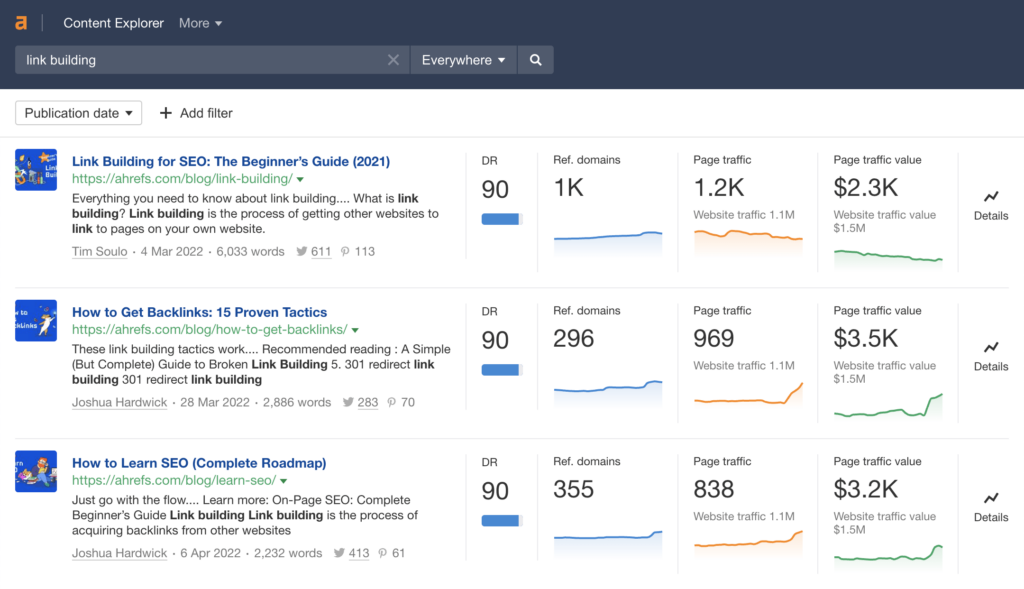
This makes it invaluable when planning a content strategy or identifying link building opportunities.
The Site Audit tool crawls your website and flags technical SEO issues with clear severity ratings and fix instructions. And the Rank Tracker lets you monitor your keyword positions daily, broken down by device and location.
What we like
The Content Gap feature compares your keyword profile against up to three competitors and surfaces the terms they rank for that you don't.
When we ran this recently, it uncovered dozens of relevant keywords we hadn't considered, several of which became the basis for new content that started ranking within weeks.
What users say
Users consistently highlight Ahrefs’ reliable data, especially for keyword research and backlink analysis, along with its clean interface and strong competitor insights that make it easy to spot actionable opportunities.
"Ahrefs is insanely reliable when it comes to SEO data... the backlink index is one of the strongest in the industry, and the keyword research data feels very close to real-world rankings and traffic."
The most common drawbacks are pricing and usage limits. Smaller teams mention that plans can be expensive, and the credit-based system can restrict deeper analysis, with occasional complaints about data accuracy or access issues.
"Reports eat up credits very fast when doing deep competitor backlink analysis... higher plans are expensive for small teams or freelancers."
Pricing
Ahrefs offers a free Webmaster Tools plan with limited access to Site Explorer and Site Audit. Paid plans include:
- Starter ($29/month for 1 project)
- Lite ($129/month for 5 projects)
- Standard ($249/month for 20 projects)
- Advanced ($449/month for 50 projects)
2. Peec AI
Best for: Tracking your brand's visibility in AI search engines
Peec AI is an AI search analytics platform that shows you how your brand appears in AI-powered search engines like ChatGPT, Perplexity, and Google AI Overviews.
More people are turning to AI tools for product recommendations and research, and understanding whether your brand shows up in those conversations is becoming a real competitive advantage. That's the gap Peec AI fills.
After connecting a project, the platform started surfacing visibility data within a day.
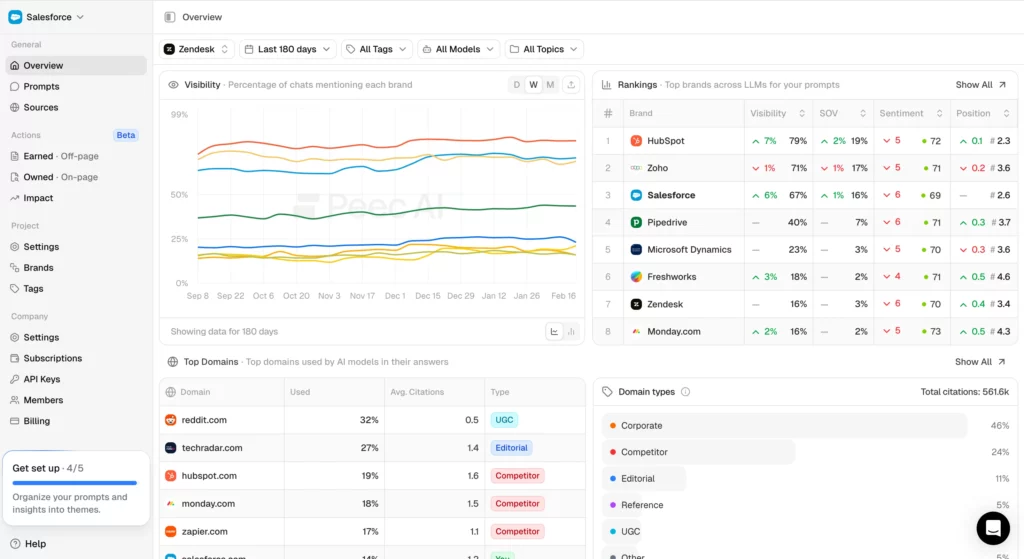
You set up prompts that mirror the questions your potential customers might ask an AI tool, and Peec AI tracks whether your brand gets mentioned, where it ranks in the response, and what the overall sentiment looks like.
There's also a suggested prompts feature that generates tracking ideas based on your website's content, which helps if you're not sure where to start.
The competitor benchmarking is useful too. You can see side by side how often your brand shows up versus your competitors, and which sources are being cited in the AI responses, giving you a clear picture of where to focus your content and PR efforts.
What we like
The citation tracking shows you exactly which web pages AI models are pulling from when they mention (or don't mention) your brand. This turns abstract "AI visibility" into something actionable.
You can see which third-party sources are getting cited and work to earn mentions on those specific sites.
What users say
Users consistently highlight Peec AI’s intuitive interface, fast setup, and ability to turn AI search visibility into clear, actionable insights. Many also mention strong customer support and the platform’s focus on meaningful metrics rather than overwhelming data.
"What I like most about Peec is how it turns AI search from a black box into something you can actually measure and grow from."
On the downside, some users want more advanced features like content workflows, deeper source insights, or easier data extraction. A few also mention onboarding challenges, manual reporting work, or keeping up with rapid feature releases.
"Even with a great UI, the gold often comes from exports and lots of manual filtering and report set up."
Pricing
Peec AI offers a free trial. Paid plans include:
- Starter (€89/month for 25 tracked prompts)
- Pro (€199/month for 100 tracked prompts)
- Enterprise (custom pricing)
Email & SMS marketing tools
3. TextNinja
Best for: Capturing leads through website-to-text conversations
TextNinja is a web-to-text tool for home service businesses. You add it to your website, and when a visitor clicks the widget, it opens a text conversation via SMS, capturing their phone number and letting you engage with them in real time.
Installation takes a couple of minutes. You get an embed code to paste into your site, and the widget starts capturing leads right away.
From the dashboard, you can manage all your text conversations, assign responses to team members, and set up automated replies for when you're not available.
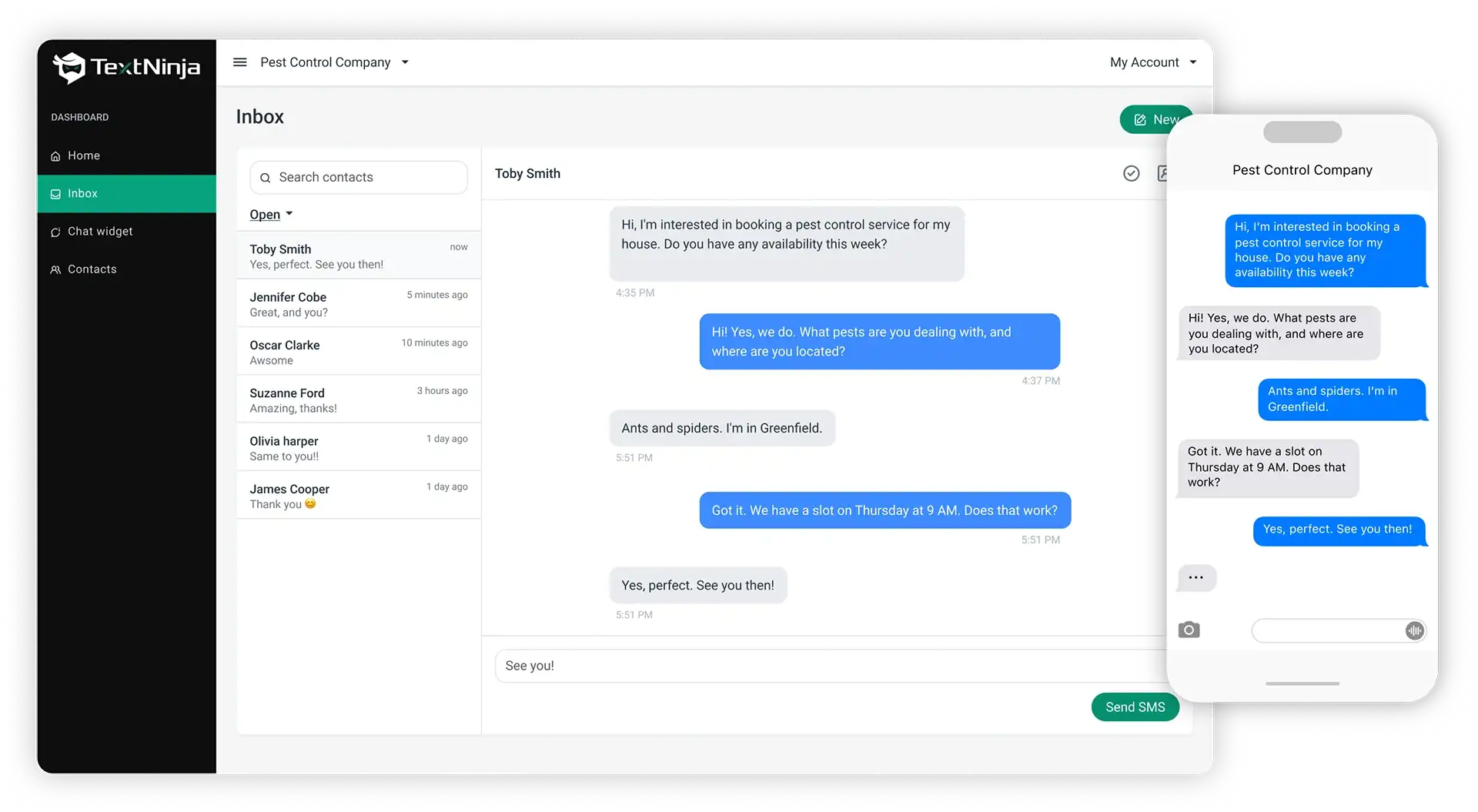
The lead management dashboard lets you tag and prioritize contacts, track response times, and review conversion analytics. It turns what would otherwise be scattered text threads into an organized pipeline.
What we like
The web-to-text approach captures a phone number the moment a visitor engages, which gives you a direct line to leads that most chat widgets can't match.
For service businesses where speed of response matters, this can significantly shorten the gap between first visit and first conversation.
What users say
Users praise TextNinja for its simple setup and the immediate impact it has on customer engagement.
"Extremely easy to use, set up was effortless and support was great."
Pricing
TextNinja offers a 14-day free trial with no credit card required. Paid plans start at $29/month.
Pricing scales based on the number of message credits you need. Each SMS counts as 1 credit, and each MMS counts as 3 credits. Incoming messages are free.
Stop losing jobs to slow responses
TextNinja turns website visitors into text conversations so your team can respond faster and win more work.
Start free trial
4. Mailchimp
Best for: Email campaigns for growing contact lists
Mailchimp is one of the most widely used email marketing platforms for small businesses, and it balances power and ease of use well.
We've worked with Mailchimp on several accounts. The email builder is clean and quick to use, with enough templates to cover most use cases.
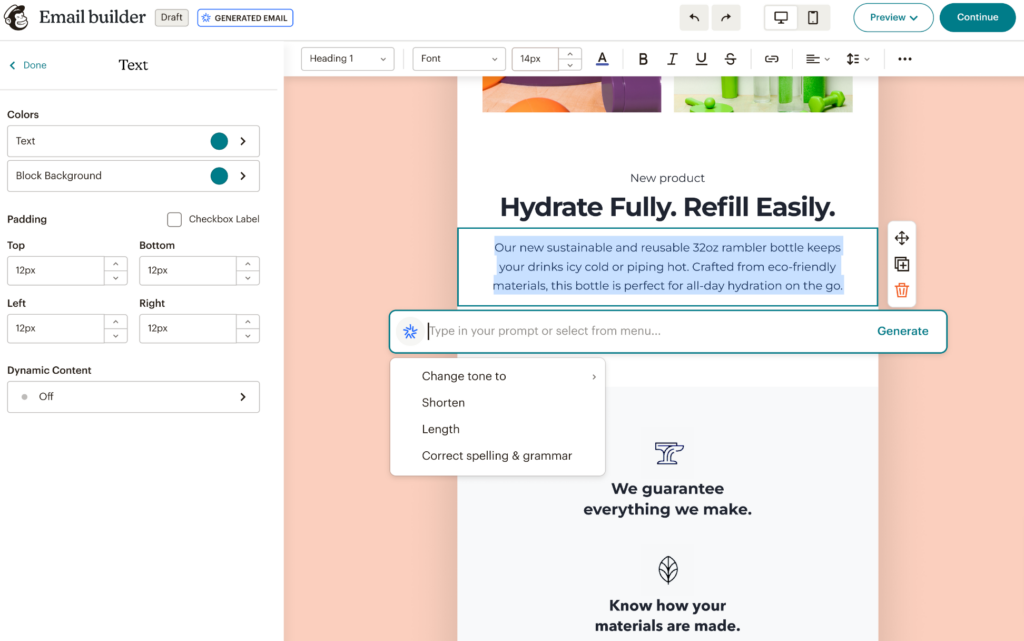
You can customize everything to match your brand, and the AI copy generator can produce draft text in seconds when you need a starting point.
Where Mailchimp earns its place is in segmentation and automation. You can target subscribers based on purchase history, engagement, location, and dozens of other attributes.
The automation workflows (welcome sequences, abandoned cart emails, re-engagement campaigns) run on autopilot once they're set up.
What we like
The Subject Line Helper analyzes your subject line before you hit send and suggests improvements based on data from similar campaigns.
It's a small feature, but it can make a noticeable difference in open rates, especially if writing email subject lines isn't something you do every day.
What users say
Users consistently praise Mailchimp for its ease of use, especially the drag-and-drop builder, templates, and straightforward automation features that make it easy to launch campaigns quickly without technical expertise.
"I like how intuitive and user-friendly Mailchimp is. It makes creating and designing email campaigns really easy, even for someone without a lot of experience."
The main downsides are pricing and limitations as you scale. Users note that costs increase quickly with larger contact lists, and more advanced automation, customization, and reporting often require higher-tier plans.
"The pricing model becomes quite expensive as your contact list grows... advanced features are locked behind higher-priced plans."
Pricing
Mailchimp's pricing is based on the size of your contact list. Paid plans start at $20/month for 500 contacts.
5. Brevo
Best for: Affordable email and SMS marketing with generous sending limits
Brevo (formerly Sendinblue) is an email and SMS marketing platform that stands out for its pricing model. Instead of charging based on the number of contacts, Brevo charges based on the number of emails you send.
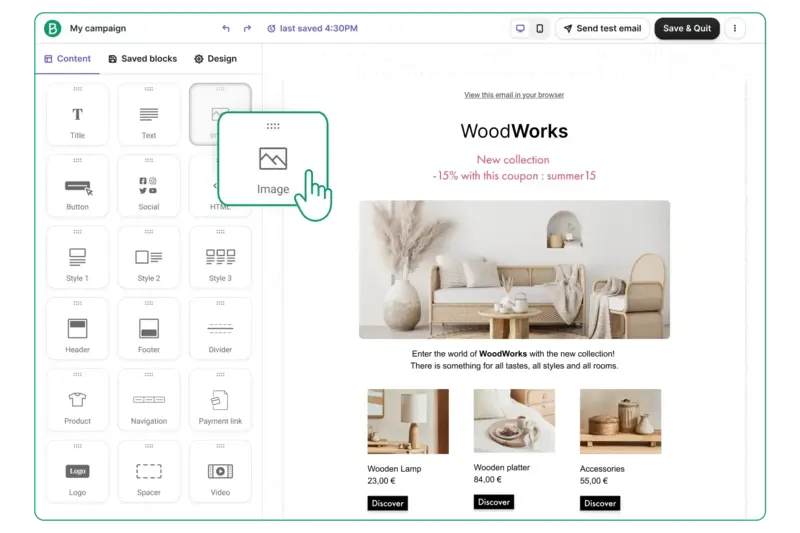
This makes it a strong option for businesses that have a large contact list but don't email at high frequency. You can store up to 100,000 contacts on the free plan alone.
We set up a few automated workflows in Brevo (a welcome sequence and a re-engagement campaign) and had them running within an hour.
The automation builder is visual and intuitive, and the platform includes SMS and WhatsApp messaging alongside email, which gives you multiple channels without needing separate tools.
What we like
The send-based pricing means you're not penalized for growing your contact list. Most email platforms get expensive fast once you pass a few thousand subscribers. Brevo lets you keep everyone on your list and only pay for what you actually send.
What users say
Users consistently highlight Brevo’s ease of use, flexible pricing model, and all-in-one functionality, with email, SMS, automation, and contact management working together in a way that’s accessible even for non-technical users.
"What I like most about Brevo is how easy and intuitive it is to use — even if you don’t have a technical background."
The main drawbacks are limitations in advanced features and occasional usability issues, with some users mentioning basic automation compared to higher-end tools, as well as slower performance and less detailed reporting in certain cases.
"Some of the more advanced automation and segmentation capabilities can feel a bit basic compared to higher-end tools."
Pricing
Brevo offers a free plan with 300 emails per day and up to 100,000 contacts. Paid plans include:
- Starter (from $9/month for 5,000 emails)
- Standard (from $18/month for 5,000 emails, adds automation and landing pages)
- Professional (from $499/month for 150,000+ emails)
Social media marketing tools
6. Buffer
Best for: Simple, affordable social media scheduling
Buffer makes social media management straightforward. You can plan and schedule posts across Facebook, Instagram, X, TikTok, YouTube, LinkedIn, and more, all from one dashboard.
We've used Buffer across a number of client accounts and always come back to it for its simplicity.
You can queue posts to publish automatically on a set schedule, or pick custom times for individual posts.
Buffer recommends optimal posting times based on your historical engagement data, and the approval workflow keeps everything on-brand before it goes live.
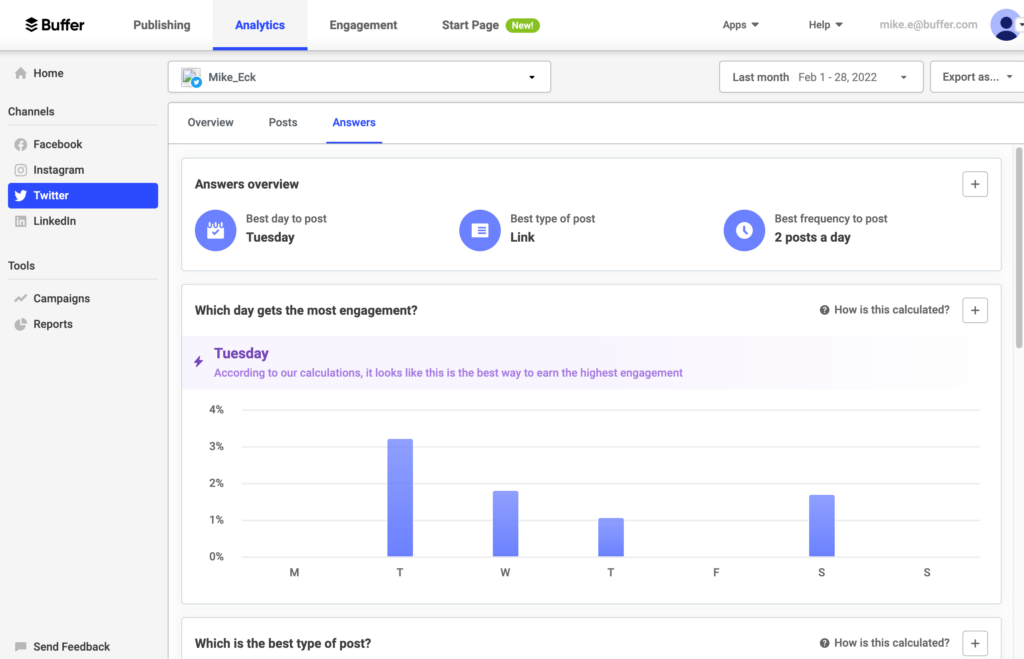
The AI assistant can generate post ideas and captions, and there's a built-in post library for saving content you want to reuse or repurpose later.
What we like
The per-channel pricing model means you only pay for the social accounts you actually use.
If your business is only active on two or three platforms, you won't get stuck paying for a bundle of channels you'll never touch, which is a common frustration with larger social media tools.
What users say
Users consistently highlight Buffer’s simplicity and ease of use, especially for scheduling and managing posts across multiple platforms, with the visual calendar and “set it and forget it” workflow saving significant time.
"What I genuinely love most about Buffer is how simple and clean it makes everything... the app just reliably takes care of the posting for you."
The main drawbacks are limited advanced features, with users mentioning basic analytics, weaker engagement and social listening tools, and pricing that can increase as you manage more accounts.
"The primary downside of Buffer is its simplicity—it lacks the advanced features found in competitors."
Pricing
Buffer offers a limited free plan. Paid plans include:
- Essentials ($6/month per channel)
- Team ($12/month per channel)
- Agency ($120/month for 10 channels)
7. Hootsuite
Best for: Managing social media at scale across many accounts
Hootsuite is built for businesses and teams that need to manage a larger social media presence. It supports scheduling, monitoring, and analytics across all major platforms from a single dashboard.
We ran Hootsuite across Instagram, LinkedIn, and Facebook to see how it handles multi-platform management.
The scheduling tools are solid. You can plan posts using a calendar view, and the platform suggests optimal publishing times based on your audience's activity patterns.
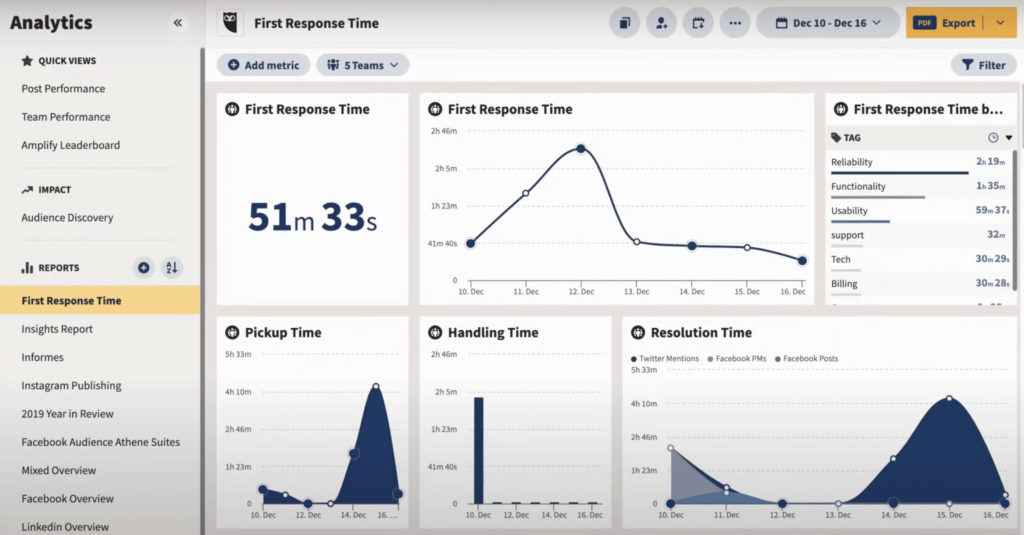
The unified inbox is where Hootsuite shines for busy teams. It pulls in messages and comments from every connected account, so you can respond to everything from one place instead of jumping between platforms.
The social listening tools also let you track brand mentions, keywords, and industry conversations in real time.
What we like
The social listening feature goes beyond tracking your own mentions. You can monitor industry keywords and competitor activity, which gives you a real-time view of what people are talking about in your space.
This is useful for spotting trends, jumping into conversations, and staying ahead of potential issues.
What users say
Across reviews, Hootsuite stands out for saving time by bringing scheduling, messaging, and analytics into one place, making it easier to manage multiple social accounts without constantly switching between platforms.
"Using Hootsuite saves our small team hours of time by letting us manage multiple social media platforms from one dashboard."
That said, some friction comes up around usability and cost. Users mention a steeper learning curve, a cluttered interface at times, and pricing that can feel high, especially when advanced features are locked behind higher tiers.
"What I dislike about Hootsuite is that the pricing can feel a bit high... the interface can also feel slightly overwhelming when managing multiple streams."
Pricing
Hootsuite's plans start at $99/month per user (billed annually) for the Standard plan, which includes up to 10 social accounts.
The Advanced plan is $249/month per user and adds features like unlimited social accounts and enhanced reporting. A 30-day free trial is available.
Advertising & paid media tools
8. AdCreative.ai
Best for: Generating ad creatives and copy with AI
AdCreative.ai uses artificial intelligence to generate ad visuals and copy for your paid campaigns across platforms like Facebook, Instagram, and Google.
We gave the tool a product description and let it generate a batch of ad variations. The output was solid enough to use as a starting point, and the process of going from a brief to a set of usable creatives took minutes rather than hours.
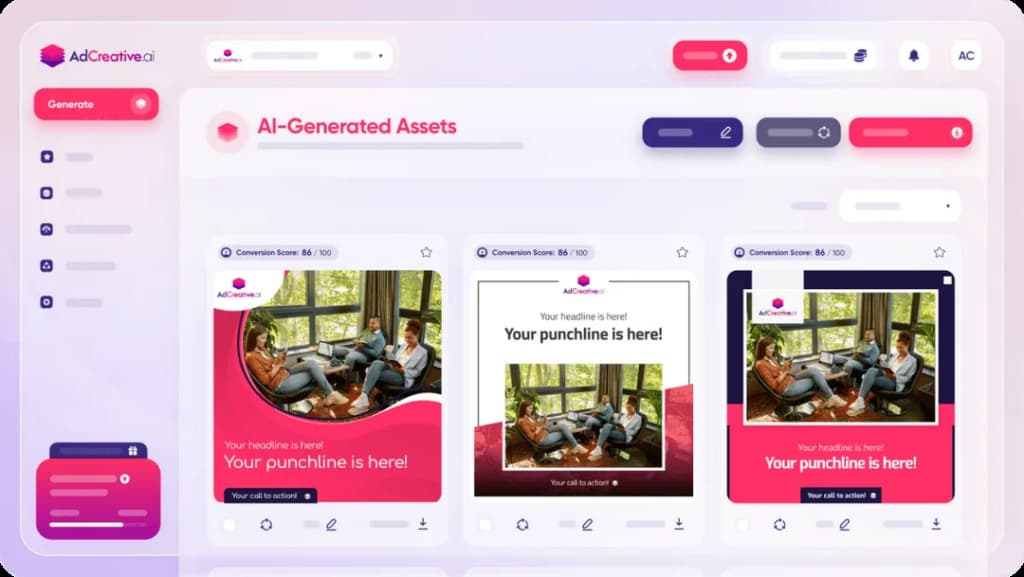
You can also have the platform build out full ad campaigns. Provide details about your product or service, and it generates the creatives and suggests target audiences.
What we like
The competitive analysis feature lets you peek at competitors' ad campaigns and identify their best-performing creatives.
Before spending money on your own ads, you get concrete examples of what's already working in your space, which is a smart way to inform your creative direction.
What users say
What stands out in positive reviews is the speed and ease of generating ad creatives, with users appreciating how quickly they can go from a brief to multiple variations without needing design skills.
"The initial setup was exceptionally easy and quick... and it generates ad creatives much faster than previous tools I've used."
Where it falls short is in control and consistency. Some users note that customization options are limited once creatives are generated, which can make it harder to fully align outputs with specific brand guidelines.
"The customization options can feel somewhat limited once the AI generates the initial creatives."
Pricing
AdCreative.ai offers the following plans:
- Startup ($29/month for 10 credits)
- Professional ($209/month for 100 credits)
- Ultimate ($549/month for 500 credits)
9. Adzooma
Best for: Optimizing ad campaigns across Google, Meta, and Microsoft
Adzooma connects to your Google Ads, Meta Ads, and Microsoft Ads accounts and gives you optimization recommendations from a single dashboard.
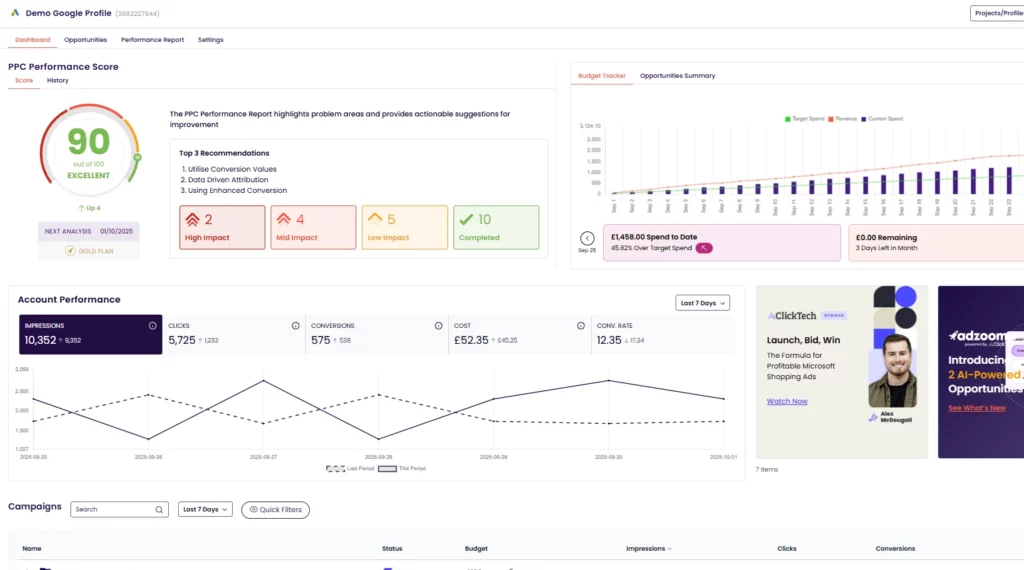
After connecting a Google Ads account, the Opportunity Engine immediately began surfacing specific improvements. Things like adding negative keywords, adjusting bids, and pausing underperforming ads.
Each suggestion comes with a one-click apply option, so you can act on recommendations without digging into the native ad platform.
For a small business running paid ads without a dedicated media buyer, this kind of guided optimization can save both time and budget.
What we like
The free plan includes campaign monitoring, optimization suggestions, and basic reporting, which is rare for ad management tools.
Most competitors require a paid subscription before you can access any core features, so Adzooma's free tier makes it a practical entry point for small businesses getting started with paid advertising.
What users say
A common theme in reviews is how much time Adzooma saves through automation and centralized campaign management, with users appreciating the ability to manage multiple ad platforms and act on optimization suggestions from a single dashboard.
"With its automation features, I've saved valuable time on tasks like ad scheduling and bid management."
At the same time, some trade-offs come up around accuracy and control. Users mention occasional issues with data reliability, limited features on certain platforms, and cases where performance or recommendations didn’t fully match expectations.
"Not always accurate on data pulled from accounts... tool can be glitchy in the meantime."
Pricing
Adzooma offers a free plan with core optimization and reporting features. The Plus plan starts at $99/month and unlocks advanced automation, custom reporting, and additional features.
Reputation management tools
10. LocalImpact
Best for: Collecting and managing online reviews
LocalImpact is a reputation management platform that helps businesses track, manage, and respond to online reviews across 30+ review sites, including Google, Facebook, Yelp, and Tripadvisor.
Setting it up was quick. Once connected, the platform monitors review sites and sends notifications as soon as a new review comes in.
You can read and reply to reviews from a single feed, and set up automated email and SMS sequences to encourage customers to leave reviews.
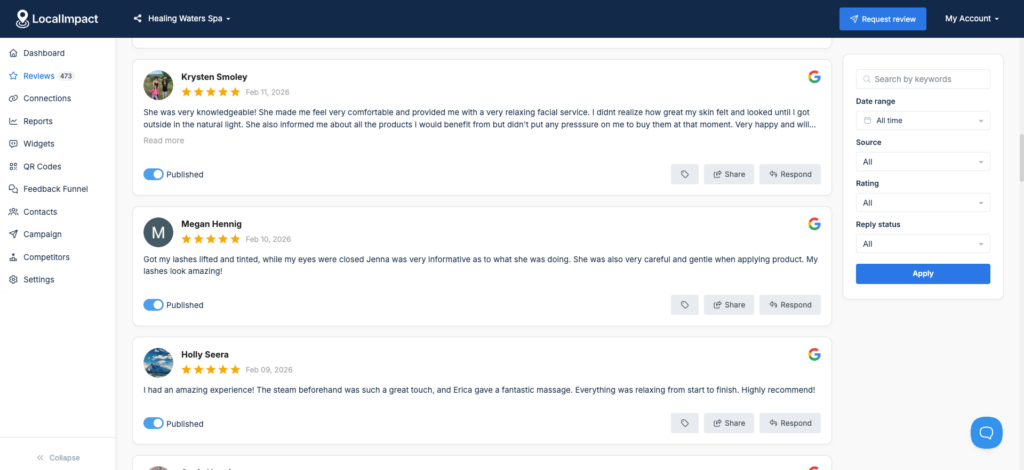
There's also a review widget that lets you display your top reviews directly on your website.
What we like
The AI reply feature generates personalized responses to reviews in seconds. For businesses that receive a steady stream of reviews, this removes the bottleneck of crafting individual replies. You can stay responsive without it eating into your day.
What users say
Reviewers consistently highlight how simple LocalImpact is to set up and start using, even for non-technical business owners.
The automated review collection, review widget, and responsive customer support are the features users mention most.
"The platform is extremely easy to set up and integrate with my existing website. The automation tools save me time collecting and displaying reviews.
Customer support is quick to respond and always helpful."
Pricing
LocalImpact offers the following plans:
- Essentials ($19/month)
- Growth ($49/month)
- Agency ($99/month)
Automation tools
11. Zapier
Best for: Connecting apps and automating tasks without code
Zapier is a no-code automation platform that connects over 7,000 apps and lets you build workflows that run in the background.
We've used Zapier across dozens of projects to bridge gaps between tools that don't have native integrations.
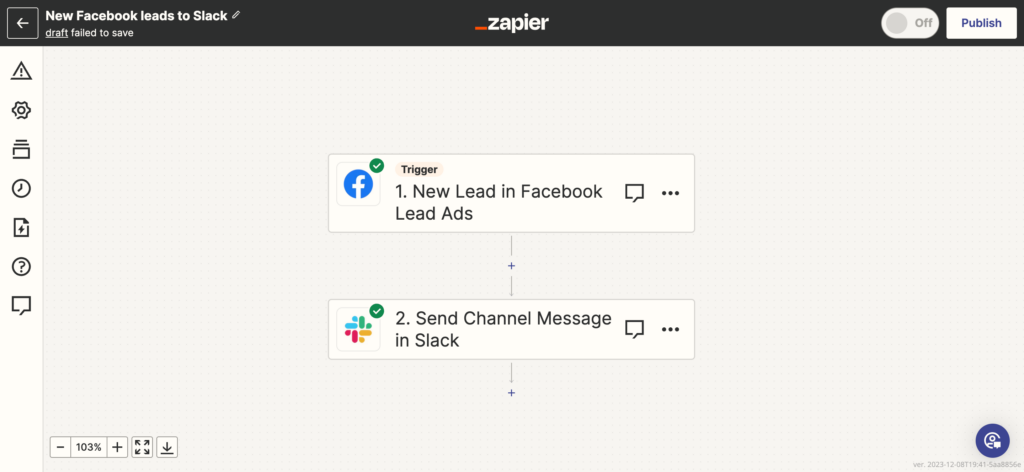
The AI-powered automation builder is a nice addition. You can describe what you want automated in plain English, and it generates a working workflow.
The pre-built templates cover common setups like syncing new leads to a CRM, triggering Slack alerts from form submissions, or adding email subscribers from a spreadsheet. You can get a useful automation running in under five minutes.
What we like
The sheer number of integrations means Zapier can sit at the center of almost any marketing stack.
Whatever combination of tools you're using, there's a good chance Zapier can connect them, which makes it a practical first step before investing in more complex automation software.
What users say
What stands out across reviews is how effectively Zapier automates repetitive work and connects different tools, helping small teams save time and reduce manual processes without needing technical skills.
"Zapier provides a non-coding method of connecting disparate systems... replacing manual processes with an automatic way of moving data."
Where friction shows up is in pricing and complexity at scale. Users mention task-based pricing becoming restrictive as usage grows, along with a learning curve when building more advanced workflows.
"The pricing and task limits can become restrictive as usage grows... especially when running multiple workflows at scale."
Pricing
Zapier offers a limited free plan. Paid plans include:
- Professional (from $29.99/month)
- Team (from $103.50/month)
- Enterprise (custom pricing)
12. Make
Best for: Complex, multi-step workflow automation on a budget
Make (formerly Integromat) is a visual workflow automation platform that connects over 3,000 apps. It's built for users who need more flexibility than basic automation tools offer.
We built a multi-step workflow that routed new form submissions to a CRM, sent a Slack notification to the sales team, and triggered a welcome email sequence.
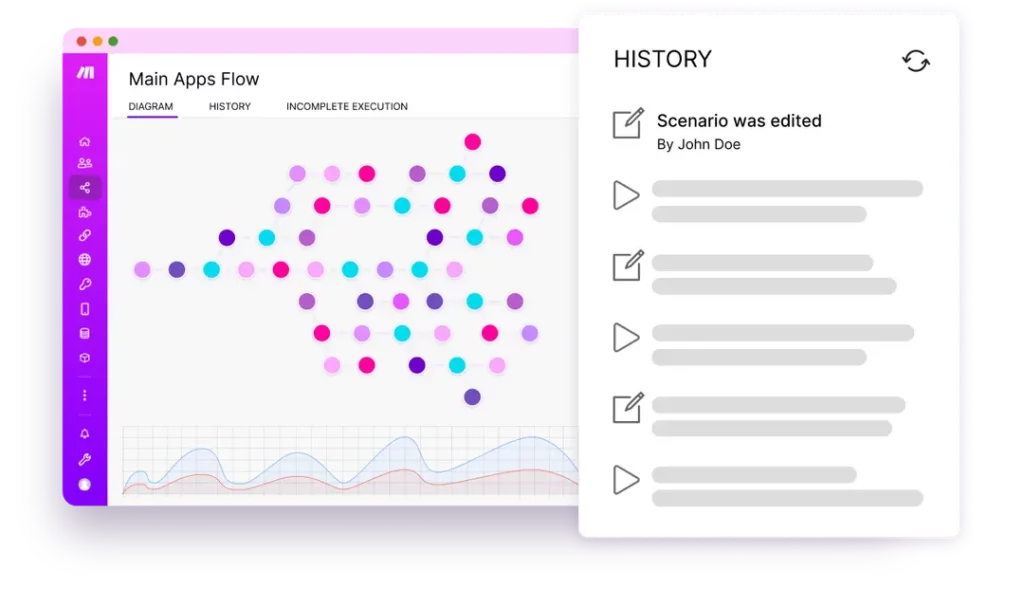
The visual builder made it easy to see exactly how data moved between each step.
Make supports conditional branching, loops, and error handling, all of which let you build more sophisticated automations than most no-code tools allow.
What we like
The credit-based pricing makes complex workflows significantly cheaper than tools that charge per task. In most automation platforms, a five-step workflow counts as five tasks.
Make's pricing structure handles this more efficiently, which adds up fast if you're running multi-step automations at any volume.
What users say
What comes through in reviews is how flexible and powerful Make is for building automations, with users appreciating its visual builder, wide range of integrations, and ability to handle more complex workflows than simpler tools.
"It allows us to automate communication between teams and keep project data updated automatically instead of moving information manually."
That flexibility comes with a trade-off. Several users mention a steeper learning curve, especially when setting up scenarios or troubleshooting errors, along with some limitations around pricing transparency or advanced features.
"It can take some time to understand how the logic works between modules and how data flows through the system."
Pricing
Make offers a free plan with 1,000 operations per month. Paid plans include:
- Core (from $10.59/month for 10,000 operations)
- Pro (from $18.82/month with priority execution)
- Teams (from $34.12/month with team features)
- Enterprise (custom pricing)
Analytics & reporting tools
13. Fathom Analytics
Best for: Privacy-friendly website analytics with a clean, simple dashboard
Fathom Analytics is a lightweight, privacy-focused alternative to Google Analytics. It gives you the essential website traffic data you need without the complexity or the cookies.
Setup took under two minutes. You add a single line of code to your site, and data starts flowing immediately.
The dashboard is a single page that shows your key metrics (visitors, page views, referral sources, top pages, and campaign performance) all without requiring you to click through layers of menus or configure custom reports.
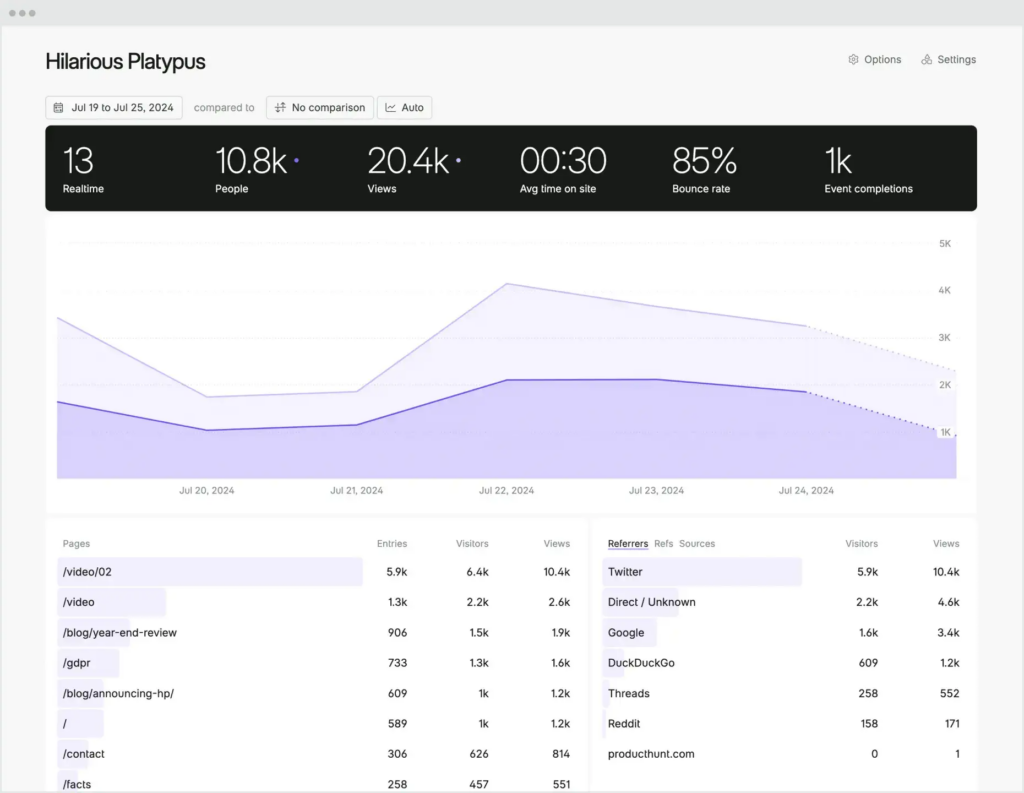
Fathom supports UTM tracking and custom events, so you can still measure campaign performance and specific user actions. And the platform sends weekly or monthly email reports, which is useful if you want a regular snapshot without logging in.
What we like
Because Fathom doesn't use cookies, you don't need to show a cookie consent banner.
This keeps your site cleaner, removes a friction point for visitors, and sidesteps the compliance headaches that come with running a cookie-based analytics tool, especially if you serve customers in the EU.
What users say
Many reviewers point to Fathom’s simplicity and privacy-first approach as its biggest strengths, with a clean dashboard and lightweight setup that make it easy to get useful insights without the complexity of traditional analytics tools.
"The straightforward, user-friendly dashboard... allows me to effortlessly access and interpret key metrics without the hassle of navigating through complex reports."
The trade-off is depth. Some users mention that reporting, customization, and advanced analytics features are more limited compared to tools like Google Analytics, especially for deeper analysis.
"It has limited features, minimalist approach... it can improve in the feature area."
Pricing
Fathom Analytics pricing is based on your website's monthly traffic and starts at $15/month.
Build your marketing stack one tool at a time
You don't need all 13 of these tools. Most small businesses can cover their bases with three or four well-chosen picks, one for each area of marketing that matters most to their business right now.
If you're not sure where to start, think about where you're currently losing the most time or leaving the most opportunity on the table.
Not showing up in search results? Ahrefs can help you figure out why. Getting website traffic but no leads? TextNinja can turn those visitors into conversations.
Struggling to keep up with social media? Buffer makes scheduling simple.
The best marketing stack is the one you'll actually use. Start small, get comfortable with a few tools, and add more as your business grows.