
Running a small business means wearing a dozen hats, and the right tools can make each one a little easier to manage.
Whether you're looking for help with accounting, marketing, project management, or hiring, there's a growing ecosystem of software built to save you time and money.
We've spent over 100 hours testing small business tools across eight categories to help you find the ones worth paying for.
Best small business tools in 2026
No time to read the full list? Here's a quick comparison.
| Tool | Category | Best for | Starting price |
|---|---|---|---|
| Notion | Productivity | All-in-one workspace for docs, tasks, and wikis | Free; paid from $10/user/mo |
| Todoist | Productivity | Lightweight task management across devices | Free; paid from $5/mo |
| Zapier | Productivity | Automating workflows between apps | Free; paid from $19.99/mo |
| Ahrefs | SEO | Keyword research and backlink analysis | From $29/mo (Starter) |
| Buffer | Social media marketing | Scheduling and managing social posts | Free; paid from $6/mo per channel |
| ActiveCampaign | Email marketing | Email automation and CRM for growing lists | From $15/mo |
| LocalImpact | Reputation management | Online reputation management | From $19/mo |
| TextNinja | Web-to-text widget | Content creation for small businesses | From $29/mo |
| QuickBooks Online | Accounting | Full-featured bookkeeping and invoicing | From $35/mo |
| Xero | Accounting | Cloud accounting with unlimited users | From $29/mo |
| FreshBooks | Accounting | Invoicing for freelancers and service businesses | From $19/mo |
| Asana | Project management | Task tracking for non-technical teams | Free; paid from $10.99/user/mo |
| Monday.com | Project management | Visual project boards with automation | From $9/seat/mo |
| Trello | Project management | Simple Kanban boards for small teams | Free; paid from $5/user/mo |
| HubSpot CRM | CRM | Free CRM with marketing tools built in | Free; paid from $20/mo/seat |
| Pipedrive | CRM | Sales pipeline management | From $14/user/mo |
| Zoho CRM | CRM | Affordable CRM within the Zoho ecosystem | Free for 3 users; paid from $14/user/mo |
| Google Drive / Workspace | File storage & collaboration | Real-time document collaboration | Free (15GB); Business from $7/user/mo |
| Dropbox | File storage & collaboration | Reliable file syncing across devices | From $11.99/mo |
| Microsoft OneDrive | File storage & collaboration | File storage for Microsoft 365 users | Free (5GB); Business from $6/user/mo |
| Calendly | Scheduling | Appointment booking with calendar sync | Free; paid from $10/seat/mo |
| Acuity Scheduling | Scheduling | Client self-booking with payments | From $16/mo |
| Square Appointments | Scheduling | Free booking with integrated payments | Free for individuals; paid from $29/mo |
| Gusto | HR | Payroll and benefits for US small businesses | From $40/mo + $6/person |
| BambooHR | HR | Employee records and onboarding | Custom pricing |
| Deel | HR | Global hiring and contractor management | Free (basic HR); paid from $49/mo |
How we chose these tools
We evaluated each tool based on a few key criteria that matter most to small business owners:
- Ease of setup and everyday usability: A tool that takes weeks to learn isn't practical for a lean team.
- Pricing and value: Whether the free tier or entry-level plan offers enough functionality to be genuinely useful.
- Integration with other popular small business software: Most businesses rely on a connected stack rather than isolated tools.
- Real user sentiment: To get a balanced picture of what actual customers love and where they run into friction.
- Scalability: The best tools for a five-person team should still work when that team hits twenty or fifty.
Productivity tools
1. Notion
Best for: Teams that want docs, tasks, and wikis in one workspace
Notion has become a go-to workspace for small businesses that want to consolidate docs, project boards, wikis, and databases under one roof.
When we set it up for our team, we were able to build out a full internal knowledge base within a few hours, complete with linked databases and task boards that kept everyone aligned.
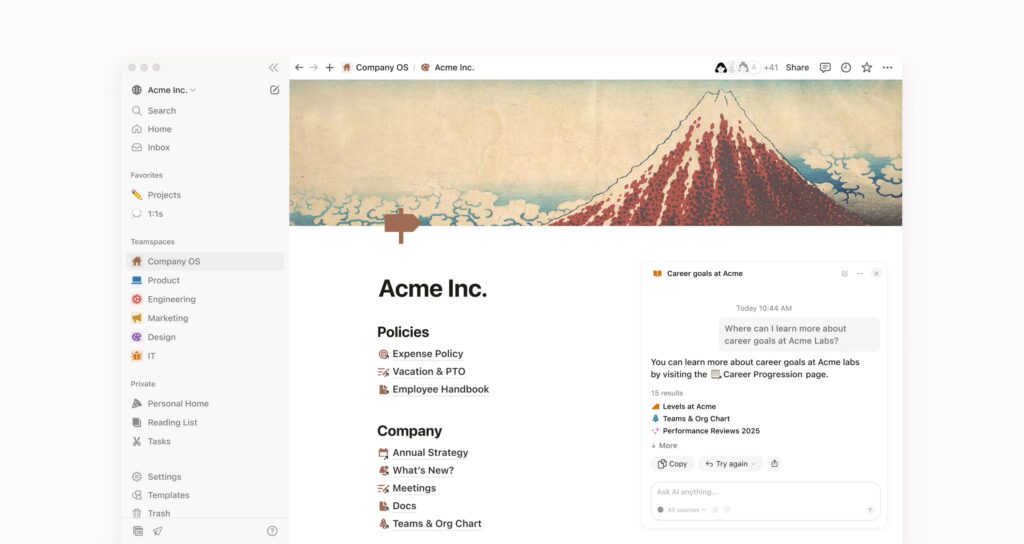
The block-based editor makes it easy to mix text, tables, checklists, and embedded content on a single page, which means fewer tabs and less context-switching throughout the day.
Real-time collaboration works smoothly, with inline commenting and simultaneous editing that feels responsive even with several people on the same page.
The template library is worth mentioning too, as it offers hundreds of pre-built layouts for everything from editorial calendars to CRM trackers.
What we like
Notion AI is a surprisingly capable addition that summarizes meeting notes, drafts outlines, and surfaces answers from your existing workspace without switching to a separate tool.
It works contextually within pages you've already built, which means your team's institutional knowledge becomes searchable and actionable instantly.
What users say
Users consistently praise Notion's flexibility and how it centralizes various workflows into a single platform, making collaboration feel more organized and intentional.
"It's flexible and everything lives in one place, so you're not constantly bouncing between tools. It gives you great visibility, where you can build something that works for you and still roll it up into a team view without duplicating work."
On the other hand, the learning curve is a frequent pain point, especially for teams moving from simpler tools like Google Docs. Larger workspaces can also start to feel sluggish as databases grow.
"Things can get messy fast without structured page links and connections. There's definitely some manual upkeep to maintain a database up to date."
Pricing
Free for individuals with basic features. Paid plans include:
- Plus: $12/user/month
- Business: $24/user/month
- Enterprise: Custom pricing
2. Todoist
Best for: Simple, cross-platform task management
Todoist is one of those tools that earns loyalty through simplicity. After spending time with it across desktop and mobile, what stood out most was how fast it is to capture tasks.
The natural language input lets you type something like "Send proposal to Sarah Friday at 2pm" and Todoist parses the date, time, and task automatically.
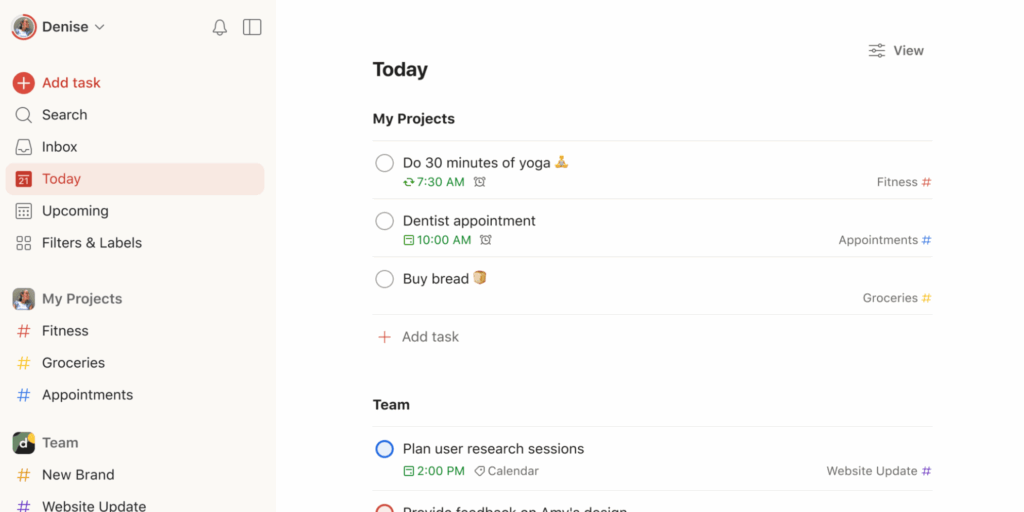
You can organize everything into projects and sections, assign priority levels, and set up recurring tasks for routines that repeat weekly or monthly.
Cross-device sync is seamless, so a task added on your phone shows up instantly on your laptop.
For small teams, the collaboration features are solid: you can share projects, assign tasks, and leave comments with file attachments to keep context right where it belongs.
What we like
The calendar view is a standout for daily planning. You can drag and drop tasks across your week to time-block your schedule, and it syncs bidirectionally with Google Calendar and Outlook so everything stays in one place.
What users say
Reviewers love Todoist for its clean interface and how quickly it becomes a daily habit, with many calling it the most intuitive task manager they've used.
"Its intuitive interface, powerful task management features, and seamless cross-device syncing allow me to stay organized and focused, whether I'm at work or on the go."
The main complaints center around the free plan's limitations, particularly the project cap and the fact that reminders are locked behind the paid tier.
"There are no custom themes and full UI personalization options. The reminders feature is only available for premium plan users, which limits casual users."
Pricing
Free plan (Beginner) with up to 5 active projects. Paid plans include:
- Pro: $7/month
- Business: $10/user/month
3. Zapier
Best for: Simple, cross-platform task management
If you've ever wished two apps would just talk to each other, Zapier is probably the answer.
We've been using it to connect tools across our stack, things like pushing new form submissions into Google Sheets, sending Slack alerts when invoices come in, and syncing CRM updates across platforms.
The setup process is genuinely beginner-friendly: you pick a trigger app, choose an event, connect an action app, and you're done.
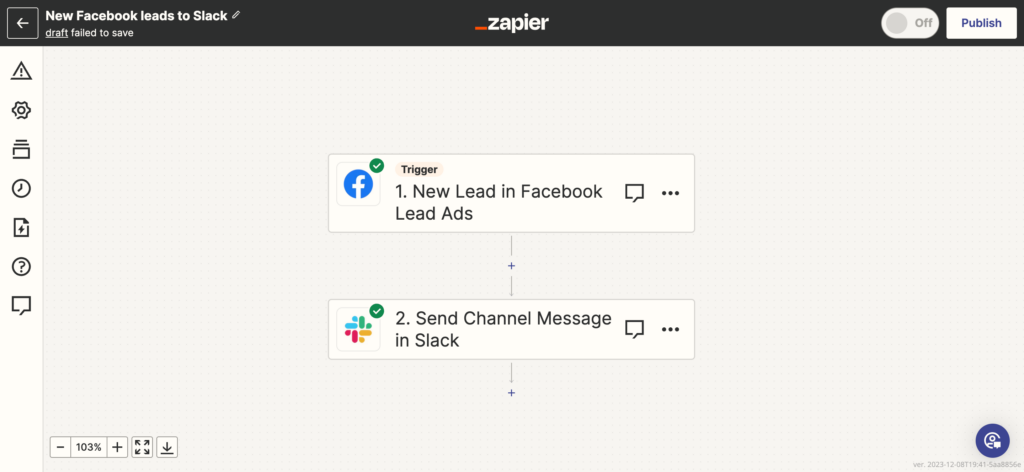
Zapier supports over 7,000 integrations, which means almost any combination of tools you're already using can be automated without writing a single line of code.
Multi-step workflows let you chain together several actions from a single trigger, and the built-in filter and formatting tools give you finer control over what data gets passed along.
What we like
Zapier's pre-built templates are a huge time saver.
There are thousands of ready-made workflows for common use cases like lead management, email notifications, and data syncing, so you can often get an automation running in under five minutes without configuring anything from scratch.
What users say
Users consistently highlight how much time Zapier saves by eliminating manual data entry and repetitive tasks, especially for teams that rely on a wide range of apps.
"Zapier has saved me hundreds of hours by automating tedious tasks, freeing me up to focus on creative work. I love its modular approach, which allows me to build fairly complex automations."
The most common frustration is pricing: as your workflows grow in complexity and volume, costs can scale quickly, with multi-step zaps and higher task limits locked behind premium tiers.
"The pricing becomes expensive as scale happens and needs grow. Advanced features like multi-step workflows are locked behind higher-tier plans."
Pricing
Free plan with 100 tasks/month and single-step zaps. Paid plans include:
- Professional: $29.99/month (750 tasks/month, multi-step zaps)
- Team: $103.50/month
- Company: Custom pricing
Marketing tools
4. Ahrefs
Best for: Keyword research and backlink analysis
Ahrefs is a powerhouse for anyone serious about search visibility.
The Site Explorer tool gave us a detailed look at our competitors' organic traffic, top-performing pages, and backlink profiles within seconds.
Keywords Explorer is where we spend most of our time, surfacing keyword ideas with search volume, difficulty scores, and click-through data that makes it easy to prioritize which terms to target.
The Site Audit feature crawls your website and flags technical issues like broken links, slow pages, and missing meta tags, then ranks them by severity so you know what to fix first.
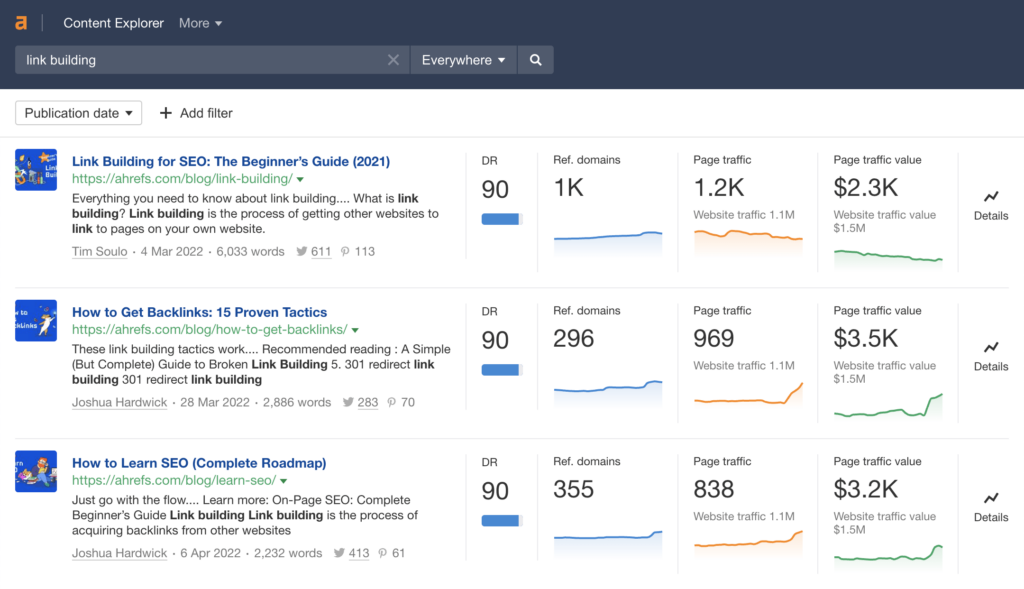
Content Explorer rounds things out by helping you discover what's already performing well in any niche, so you can plan content that fills gaps rather than duplicating what's out there.
What we like
The Rank Tracker feature deserves a callout for how cleanly it visualizes your keyword positions over time.
You can compare your rankings against specific competitors, filter by location and device, and get a snapshot of SERP features you're appearing in, all from a single dashboard.
What users say
Reviewers praise Ahrefs for the depth and accuracy of its backlink data, along with an interface that makes complex SEO research feel approachable.
"The platform streamlines the process of analyzing backlinks, keywords, and competitors, allowing me to identify actionable opportunities efficiently."
The biggest gripe across reviews is pricing, which many freelancers and small teams find steep, especially with the credit-based system that can feel restrictive during heavy research sessions.
"The credit-based limits on reports can feel restrictive, especially when conducting frequent or large-scale research."
Pricing
Ahrefs offers the following plans:
- Starter: $29/month (100 monthly credits)
- Lite: $129/month
- Standard: $249/month
- Advanced: $449/month
5. Buffer
Best for: Scheduling social media posts across multiple platforms
Buffer keeps social media management simple, which is exactly what most small businesses need.
We've been using it to schedule posts across Instagram, Facebook, LinkedIn, and X from a single dashboard, and the content calendar makes it easy to visualize what's going out and when.
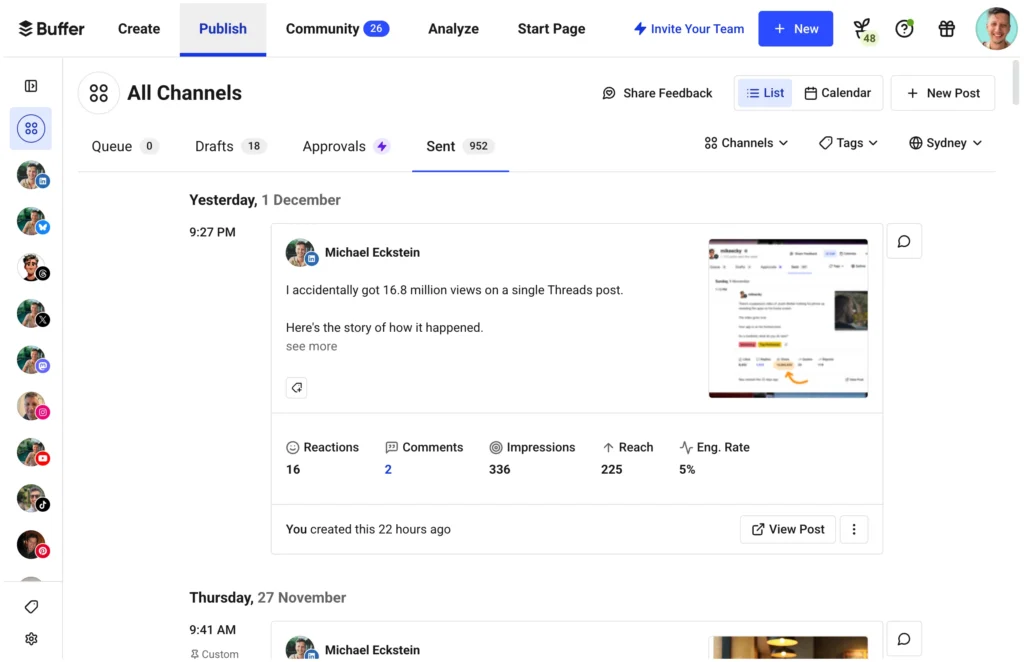
Creating posts is straightforward: you write once and then customize the copy for each platform before scheduling.
The browser extension is handy for sharing content you come across on the web, and the mobile app lets you queue posts on the go without any friction.
Buffer also includes a basic analytics suite that tracks engagement metrics for each post, helping you spot patterns in what resonates with your audience over time.
What we like
Buffer's link-in-bio page builder is a nice bonus that lets you create a simple, branded landing page for your Instagram or TikTok profile.
It pulls in your recent posts and lets you add custom links, turning social traffic into website visits without needing a separate tool.
What users say
Users consistently praise Buffer for its clean interface and how quickly they can get up and running, with scheduling across multiple platforms feeling effortless.
"It takes the overwhelming feeling out of social media management. You get this beautiful, easy-to-use content calendar where you can quickly see the entire week ahead."
On the downside, several reviewers flag that analytics are shallow compared to competitors, and costs can climb quickly once you're managing more than a handful of accounts.
"Analytics and reporting tools are insufficient, especially when compared to native platforms or other social media management tools."
Pricing
Free plan for up to 3 channels with basic publishing tools. Paid plans include:
- Essentials: $6/month per channel
- Team: $12/month per channel
6. ActiveCampaign
Best for: Email automation with built-in CRM
ActiveCampaign sits at the intersection of email marketing and CRM, and it handles both with surprising depth for a tool aimed at small businesses.
We set up our first automation sequence in under an hour, using the visual workflow builder to map out a welcome series that tags contacts, sends follow-up emails based on behavior, and routes warm leads to a sales pipeline.
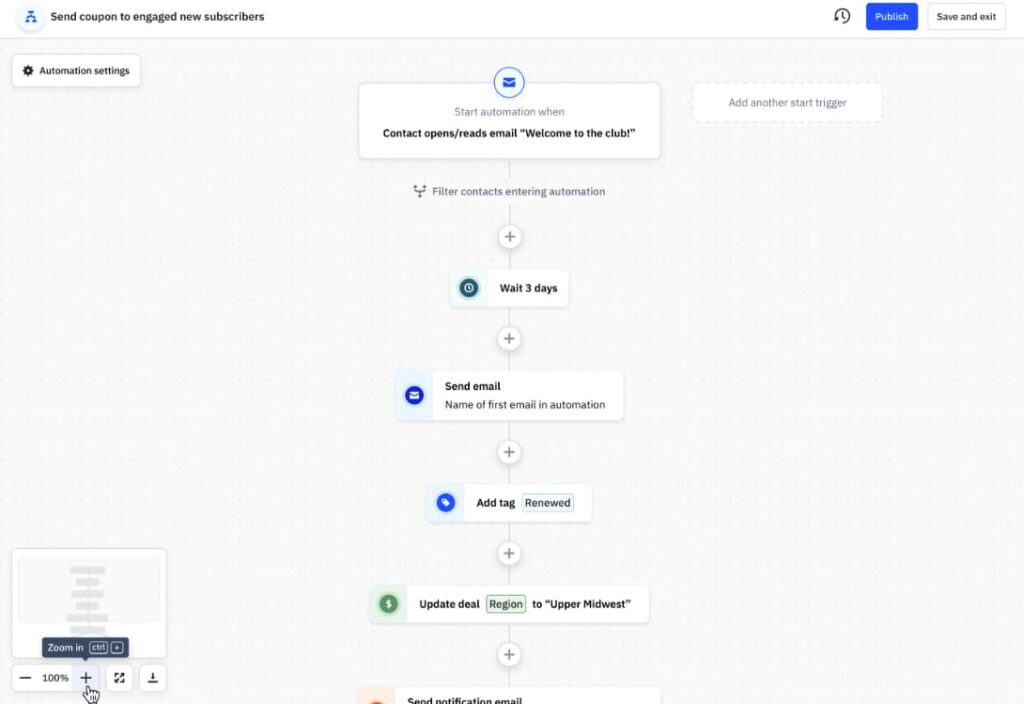
The email builder itself offers a solid drag-and-drop experience with dynamic content blocks that personalize messages based on contact data.
Beyond email, ActiveCampaign's CRM tracks deals through customizable pipelines and syncs contact activity across email opens, site visits, and form submissions.
The segmentation engine is particularly powerful, letting you create highly targeted lists based on dozens of conditions without feeling like you need a data science background.
What we like
ActiveCampaign offers hundreds of pre-built automation templates for common workflows like abandoned cart recovery, lead scoring, and re-engagement campaigns, so you can get sophisticated marketing sequences live fast without building everything from scratch.
What users say
Users frequently highlight how much depth ActiveCampaign's automation offers, praising the visual builder for making complex email sequences manageable even for smaller teams.
"The automation builder is incredibly powerful and easy to visualize. You can create complex workflows that would be impossible to manage manually."
The most common criticism is the learning curve, since the sheer number of features can feel overwhelming at first, especially for teams migrating from simpler email tools.
"The platform can feel overwhelming when you're just getting started. There are so many features that it takes time to figure out what you actually need."
Pricing
Pricing scales with contact list size. Plans for 1,000 contacts include:
- Starter: $15/month
- Plus: $49/month
- Pro: $79/month
- Enterprise: $145/month
7. LocalImpact
Best for: Collecting and managing online reviews
LocalImpact is a reputation management platform that helps businesses track, manage, and respond to online reviews across 30+ review sites, including Google, Facebook, Yelp, and Tripadvisor.
Setting it up was quick. Once connected, the platform monitors review sites and sends notifications as soon as a new review comes in.
You can read and reply to reviews from a single feed, and set up automated email and SMS sequences to encourage customers to leave reviews.
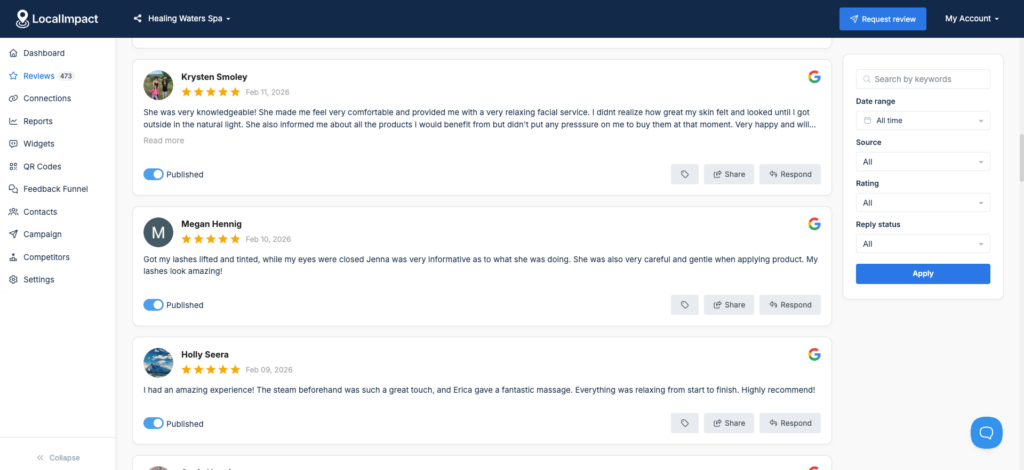
There's also a review widget that lets you display your top reviews directly on your website.
What we like
The AI reply feature generates personalized responses to reviews in seconds. For businesses that receive a steady stream of reviews, this removes the bottleneck of crafting individual replies. You can stay responsive without it eating into your day.
What users say
Reviewers consistently highlight how simple LocalImpact is to set up and start using, even for non-technical business owners.
The automated review collection, review widget, and responsive customer support are the features users mention most.
"The platform is extremely easy to set up and integrate with my existing website. The automation tools save me time collecting and displaying reviews.
Customer support is quick to respond and always helpful."
Pricing
LocalImpact offers the following plans:
- Essentials ($19/month)
- Growth ($49/month)
- Agency ($99/month)
8. TextNinja
Best for: Capturing leads through website-to-text conversations
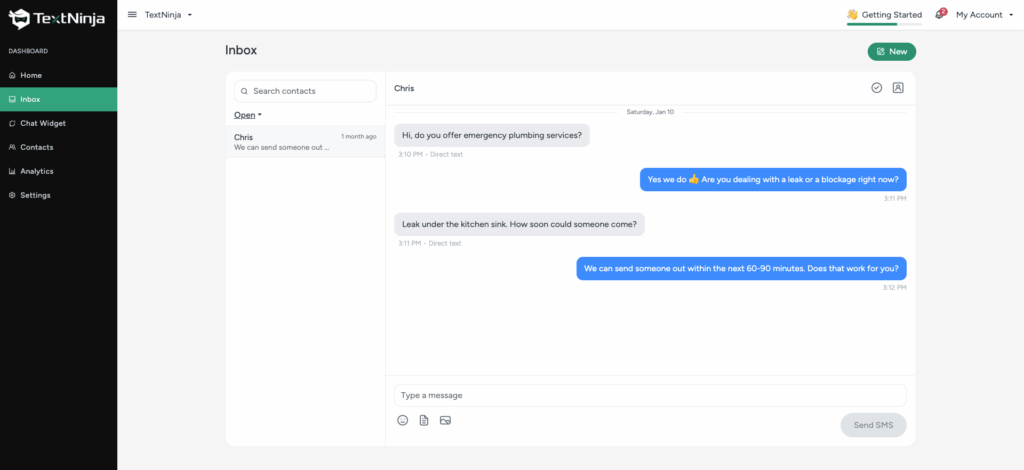
TextNinja is a web-to-text tool for home service businesses. You add it to your website, and when a visitor clicks the widget, it opens a text conversation via SMS, capturing their phone number and letting you engage with them in real time.
Installation takes a couple of minutes. You get an embed code to paste into your site, and the widget starts capturing leads right away.
From the dashboard, you can manage all your text conversations, assign responses to team members, and set up automated replies for when you're not available.
What we like
The web-to-text approach captures a phone number the moment a visitor engages, which gives you a direct line to leads that most chat widgets can't match.
For service businesses where speed of response matters, this can significantly shorten the gap between first visit and first conversation.
What users say
Users praise TextNinja for its simple setup and the immediate impact it has on customer engagement.
"Extremely easy to use, set up was effortless and support was great."
Pricing
TextNinja offers a 14-day free trial with no credit card required. Paid plans start at $29/month.
Pricing scales based on the number of message credits you need. Each SMS counts as 1 credit, and each MMS counts as 3 credits. Incoming messages are free.
Stop losing jobs to slow responses
TextNinja turns website visitors into text conversations so your team can respond faster and win more work.
Start free trial
Accounting & bookkeeping tools
9. QuickBooks Online
Best for: Full-featured small business accounting
QuickBooks Online is the accounting tool most small businesses end up gravitating toward, and after using it ourselves, it's easy to see why.
The dashboard gives you an instant snapshot of income, expenses, and cash flow, so you can make financial decisions without digging through spreadsheets.
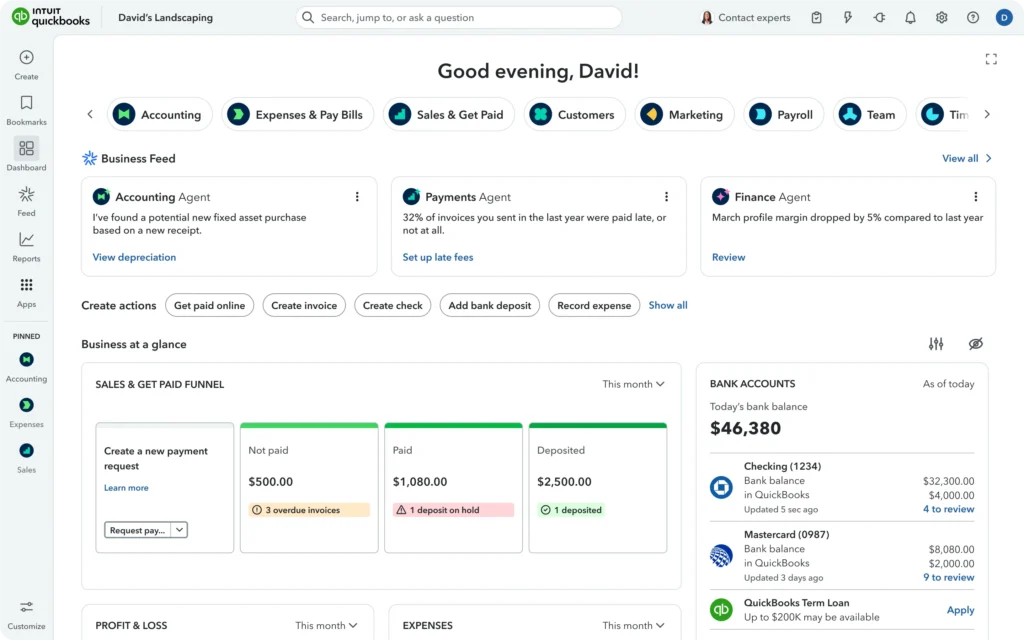
Invoicing is quick and polished: you can customize templates, add payment links so clients can pay online, and set up automatic reminders for overdue invoices.
Bank feed integration is one of the features we leaned on most, since it pulls in transactions from your bank and credit cards automatically and learns how to categorize them over time.
QuickBooks also connects to over 750 third-party apps, including PayPal, Shopify, and Square, making it a natural hub for businesses that sell across multiple channels.
Running reports like profit and loss statements, balance sheets, or tax summaries takes just a few clicks.
What we like
The AI-powered anomaly detection feature is one of the most useful things in QuickBooks.
It analyzes months of transaction data to flag unusual spending patterns or potential errors, which helps catch mistakes before they snowball into bigger problems at tax time.
What users say
Users appreciate how intuitive QuickBooks Online is, even for people without an accounting background, and praise the bank feed integration for eliminating most manual data entry.
"QuickBooks Online is very user-friendly and easy to navigate, even if you're not an accountant. The bank feed integration saves a lot of time by automatically importing and categorizing transactions."
The most common complaints revolve around rising subscription costs and customer support that can be difficult to reach, especially for users on lower-tier plans.
Pricing
Frequent promotions offer 50% off for the first three months. Plans include:
- Simple Start: $35/month
- Essentials: $65/month
- Plus: $99/month
- Advanced: $235/month
10. Xero
Best for: Teams that need unlimited users on every plan
Xero is a cloud accounting platform that's earned a loyal following, particularly among small businesses outside the US and teams that want unlimited users on every plan.
Setting up our account was fast, and the dashboard immediately felt clean and navigable, with a clear view of bank balances, outstanding invoices, and upcoming bills.
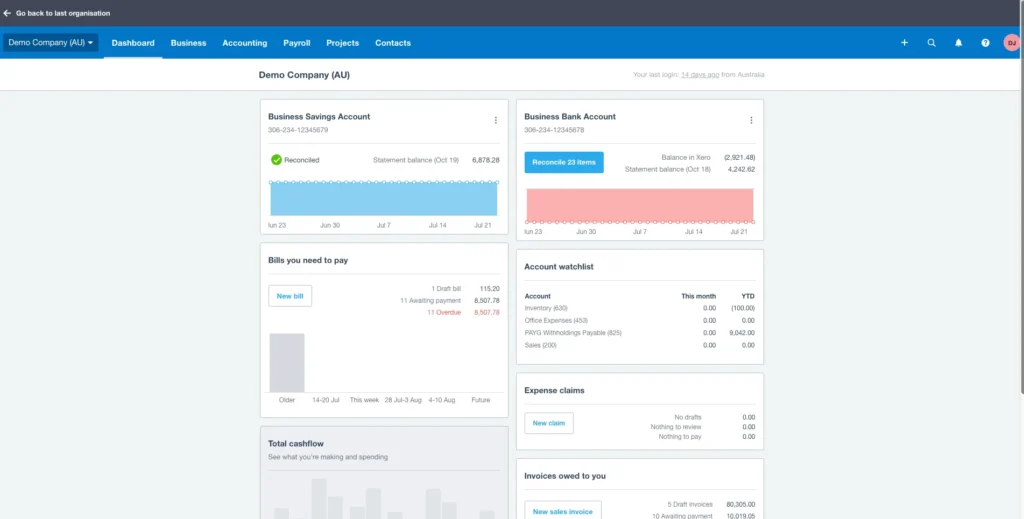
The bank reconciliation process is smooth: Xero pulls in transactions and suggests matches, making it easy to keep your books current without spending hours on data entry.
Invoicing is flexible, with options to accept payments through PayPal, Stripe, or Apple Pay directly from the invoice. Xero also handles multi-currency transactions natively, which makes it a strong pick for businesses with international clients or suppliers.
The app marketplace connects to over 1,000 integrations, from inventory management and CRM to payroll and point-of-sale systems.
What we like
Xero's project tracking feature is a nice surprise in an accounting tool.
You can assign time and expenses to specific projects, monitor profitability in real time, and generate project-level reports, all without needing a separate project management app.
What users say
Reviewers consistently highlight Xero's clean interface and the value of unlimited users, which makes it accessible to the whole team without per-seat charges.
"Xero is intuitive and well-designed. The unlimited users feature is a huge advantage for growing teams that need multiple people accessing financial data."
On the negative side, users note that the lower-tier plan is quite restrictive, and some find that reporting options lack the depth available in QuickBooks.
"The Early plan limits you to 20 invoices per month, which isn't enough for most active businesses. Reporting could be more customizable."
Pricing
All plans include unlimited users. Plans include:
- Early: $25/month (limited to 20 invoices and 5 bills)
- Growing: $55/month
- Established: $90/month
11. FreshBooks
Best for: Freelancers and service businesses that prioritize invoicing
FreshBooks has long been the favorite of freelancers and service-based businesses, and spending time with it makes clear why.
The invoicing experience is best-in-class: creating a professional invoice takes less than a minute, and you can customize everything from colors and logos to payment terms and late fees.
Time tracking is built right into the platform, letting your team log hours against specific clients and projects, then convert those hours into invoices with a single click.
Expense tracking works through receipt scanning via the mobile app, which automatically extracts amounts and categorizes them.
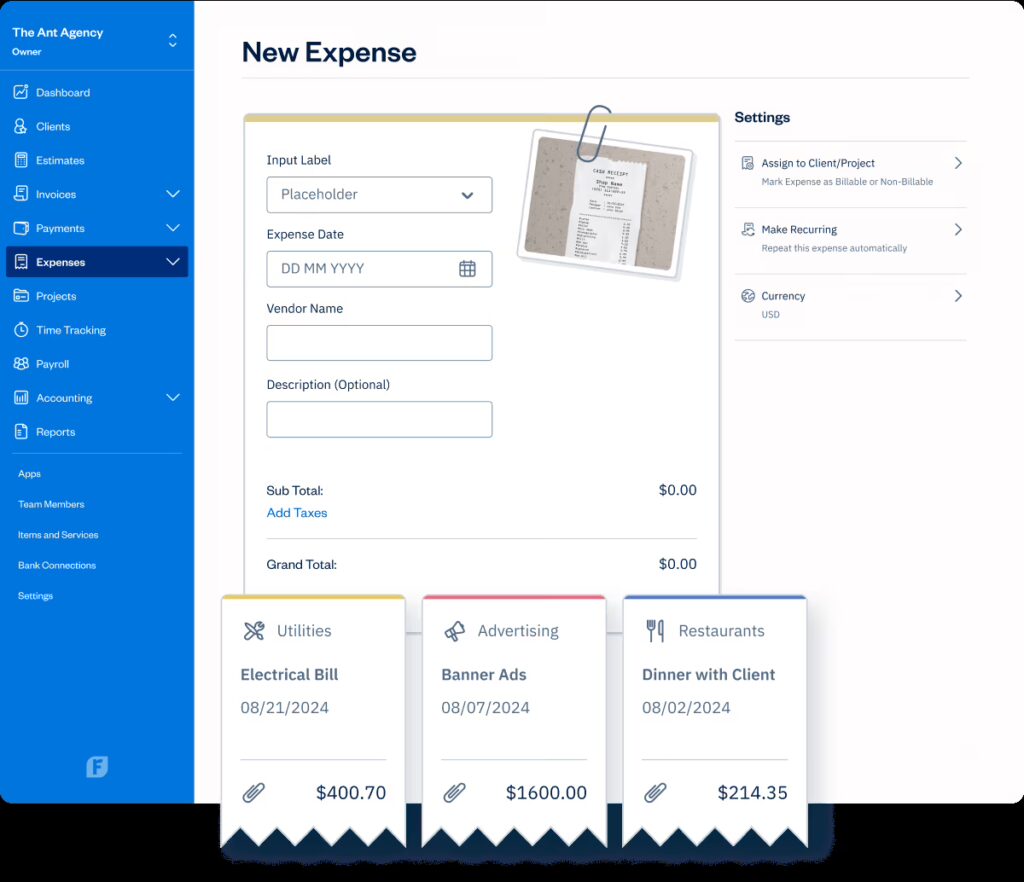
FreshBooks also handles double-entry accounting, so your books stay accurate as your business grows beyond basic freelancer needs.
The interface is notably friendly, almost playful, which makes it approachable even if accounting isn't your strong suit.
What we like
FreshBooks' client portal is a thoughtful touch that many competitors miss. Your clients get their own login where they can view invoices, make payments, approve estimates, and see their full transaction history, which cuts down on back-and-forth emails and keeps everything documented.
What users say
Users love FreshBooks for how simple and intuitive it makes invoicing, and the customer support team consistently earns high marks for responsiveness.
"FreshBooks is incredibly easy to use and the customer support is outstanding. I can create and send invoices in minutes, and getting paid has never been simpler."
The main criticisms focus on pricing that scales with the number of clients, and limited functionality for businesses with more complex accounting needs.
"The lower-tier plans limit you to a small number of clients, which can make it expensive as your business grows. It's not ideal for businesses that need advanced inventory or reporting features."
Pricing
A 30-day free trial is available. Paid plans include:
- Lite: $19/month (up to 5 clients)
- Plus: $33/month (up to 50 clients)
- Premium: $60/month (unlimited clients)
- Select: Custom pricing
Project management tools
12. Asana
Best for: Non-technical teams managing structured workflows
Asana is one of the most polished project management tools available, and it's especially well-suited for non-technical teams that need structure without complexity.
We used it to manage content calendars, product launches, and cross-team workflows, and the experience was consistently smooth.
Tasks can be organized in list, board, timeline, or calendar views, and you can switch between them with a click depending on what's most useful for the project at hand.
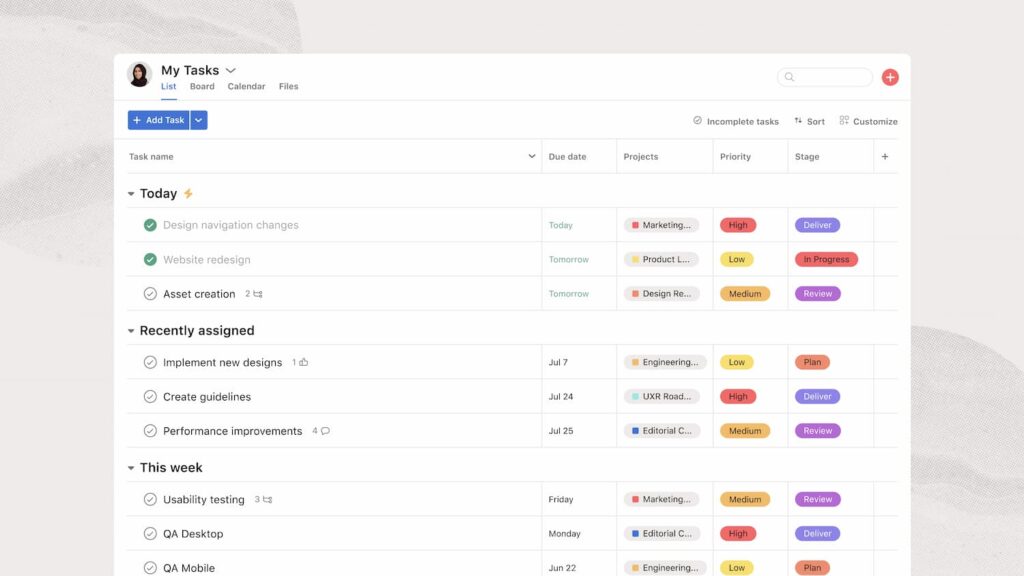
Subtasks, dependencies, and custom fields add enough depth to handle complex projects, while the clean interface keeps things from feeling cluttered.
Collaboration happens naturally within tasks through comments, file attachments, and @mentions. Asana also integrates tightly with tools like Slack, Google Workspace, and Zoom, so it fits into most existing workflows without friction.
What we like
The Workflow Builder is a standout for teams that run recurring processes.
You can visually map out a workflow with rules, triggers, and automated handoffs, so things like content approvals or client onboarding happen consistently without anyone having to chase the next step.
What users say
Reviewers appreciate Asana's intuitive design and how effectively it keeps teams aligned on who's doing what and by when.
"The workspace is very user-friendly. For daily work, Asana is a great tool due to private and team projects. You can keep all project tasks in one place and view the same project in different ways."
The most frequent criticism is that tasks can only be assigned to one person, which creates friction for collaborative work, and advanced features like portfolios and workload management require higher-tier plans.
"Asana really needs to allow users to assign a task to more than one person. Right now, you're stuck picking just one, which slows things down when teams are working together."
Pricing
Personal plan is free for up to 10 users. Paid plans (billed annually) include:
- Starter: $10.99/user/month
- Advanced: $24.99/user/month
- Enterprise: Custom pricing
13. Monday.com
Best for: Visual project tracking with built-in automations
Monday.com takes a visual-first approach to project management that makes it easy for teams to see what's happening across every workstream at a glance.
We found the color-coded boards intuitive from day one, with statuses, timelines, and ownership clearly visible without clicking into individual tasks.
Setting up a new project is fast thanks to a deep library of templates covering everything from marketing campaigns to CRM pipelines to sprint planning.
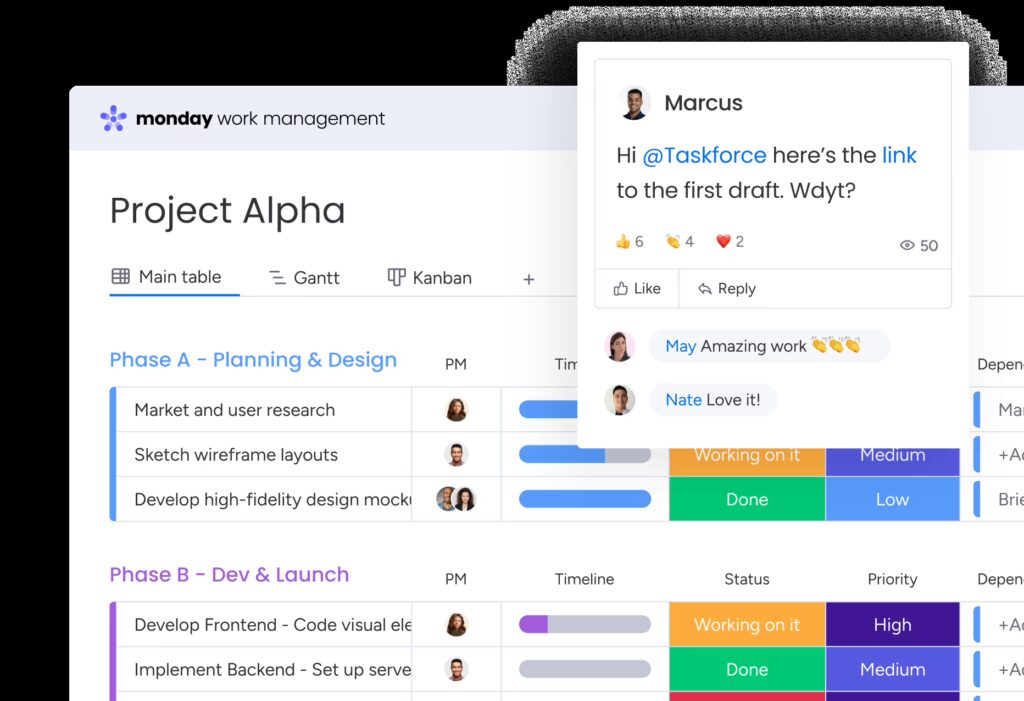
Automations are where Monday really shines for small teams: you can create rules like "when a status changes to done, notify the project lead and move the item to the completed group" without writing any code.
The platform also supports multiple views, including Kanban, Gantt, calendar, and workload, giving you flexibility to manage the same data in whatever format suits your team best.
Integrations with Slack, Google Drive, Zoom, and dozens more keep your tools connected.
What we like
Monday's dashboards deserve special mention.
You can pull data from multiple boards into a single dashboard with charts, progress bars, and number widgets, which gives leadership a high-level view of everything in motion without needing to open individual projects.
What users say
Users love the visual interface and how quickly teams can get up to speed, with the template library and drag-and-drop customization making onboarding painless.
"Monday.com is an easy-to-use project management tool. The free project template library is incredibly useful for small businesses, with pre-made outlines for editorial calendars, marketing campaigns, CRM charts, and more."
The most common downside is pricing, as costs add up with a minimum seat requirement and advanced features locked behind higher tiers.
"Cost adds up fast. Minimum three users, even if you only need two seats."
Pricing
Free plan for up to 2 seats. Paid plans (billed annually, minimum 3 seats) include:
- Basic: $9/seat/month
- Standard: $12/seat/month
- Pro: $19/seat/month
- Enterprise: Custom pricing
14. Trello
Best for: Small teams that want simple Kanban-style boards
Trello is the project management tool that feels like you already know how to use it. The entire experience is built around Kanban boards, where you create cards, drag them between columns, and organize work visually.
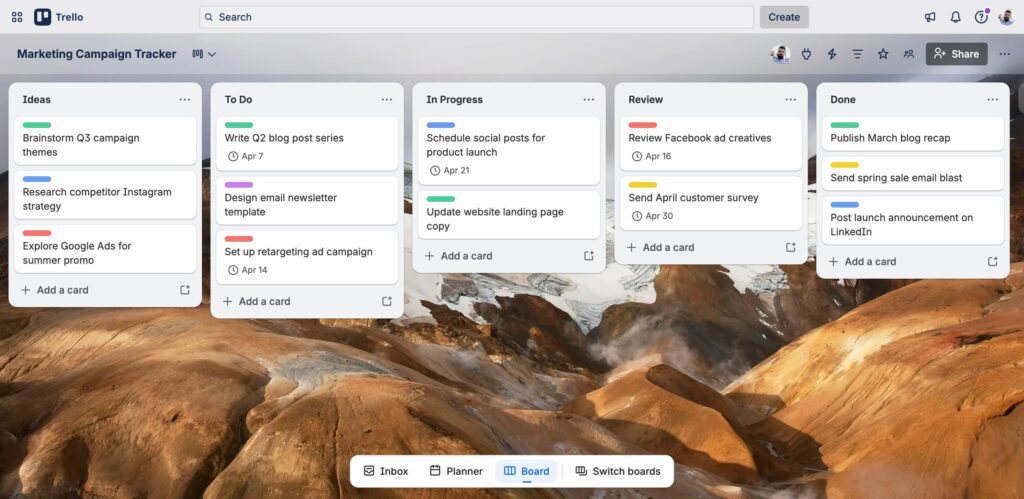
We've used it for everything from tracking editorial workflows to managing quick internal projects, and the simplicity is what keeps us coming back. Each card can hold checklists, due dates, attachments, comments, and labels, so you get enough structure without the overhead of a heavier tool.
Power-Ups extend functionality with integrations like Slack, Google Drive, and calendar views, letting you add what you need without cluttering the base experience.
The free plan is surprisingly generous, offering unlimited cards and up to 10 boards per workspace, which is enough for many small teams to operate without ever upgrading.
What we like
Butler, Trello's built-in automation engine, is more powerful than you'd expect from such a simple tool.
You can set up rules, scheduled commands, and button-triggered actions to automate repetitive tasks like moving cards, assigning members, or setting due dates based on specific triggers.
What users say
Reviewers consistently praise Trello for its simplicity and how quickly anyone on the team can start using it without training.
"It's my go-to tool for things like personal to-do lists, planning a quick social media calendar, or handling small projects with a defined beginning and end."
The flip side of that simplicity is that Trello can feel limiting for teams managing complex, multi-phase projects that need features like Gantt charts, advanced reporting, or resource management.
"Trello has its limits and is not a good fit for big projects."
Pricing
Free plan with unlimited cards and up to 10 boards. Paid plans include:
- Standard: $6/user/month
- Premium: $12.50/user/month
- Enterprise: Starting at $17.50/user/month (billed annually)
Customer relationship management (CRM) tools
15. HubSpot CRM
Best for: Small businesses that want a free, scalable CRM
HubSpot CRM stands out because its free tier is genuinely useful, giving small businesses a fully functional CRM without spending a dollar. We set up our account in under 15 minutes and immediately had access to contact management, deal pipelines, email tracking, and a meeting scheduler.
The interface is clean and well-organized, with a timeline view of every interaction you've had with a contact, from emails and calls to website visits and form submissions.
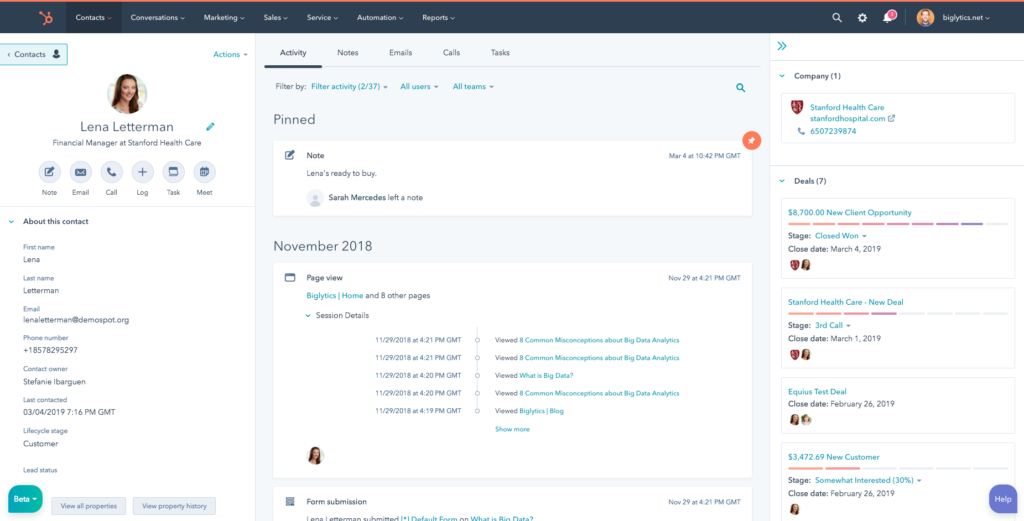
Deal tracking is visual and drag-and-drop, making it easy to move opportunities through your sales stages.
HubSpot also integrates natively with Gmail and Outlook, so emails sync automatically without any extra steps.
As your business grows, you can layer on HubSpot's marketing, service, and operations hubs, which all share the same underlying database.
What we like
The email tracking and notification feature is incredibly helpful for sales-focused teams.
You get real-time alerts when a prospect opens your email or clicks a link, which lets you follow up at exactly the right moment instead of guessing when to reach out again.
What users say
Users appreciate the generous free plan and how seamlessly HubSpot connects marketing, sales, and service data in one place.
"HubSpot's free CRM remains the most generous starting point in the market. You get unlimited users, deal pipelines, contact management, email tracking, and basic reporting without spending a dollar."
The main frustration is that automation, sequences, and deeper reporting are gated behind paid tiers that escalate quickly in price.
"The honest reality is that HubSpot's free CRM is a foundation, not a destination. Automation, sequences, and deeper reporting are locked behind paid tiers that add up quickly."
Pricing
Free plan with core CRM features. Paid plans include:
- Starter Customer Platform: $20/month/seat
- Professional: $100/month/seat
- Enterprise: Custom pricing
16. Pipedrive
Best for: Sales teams focused on pipeline management
Pipedrive was built by salespeople for salespeople, and it shows in every interaction with the platform.
The entire experience is centered around a visual pipeline where you drag deals between stages, and the focus on sales activity keeps your team moving instead of getting lost in administrative busywork.
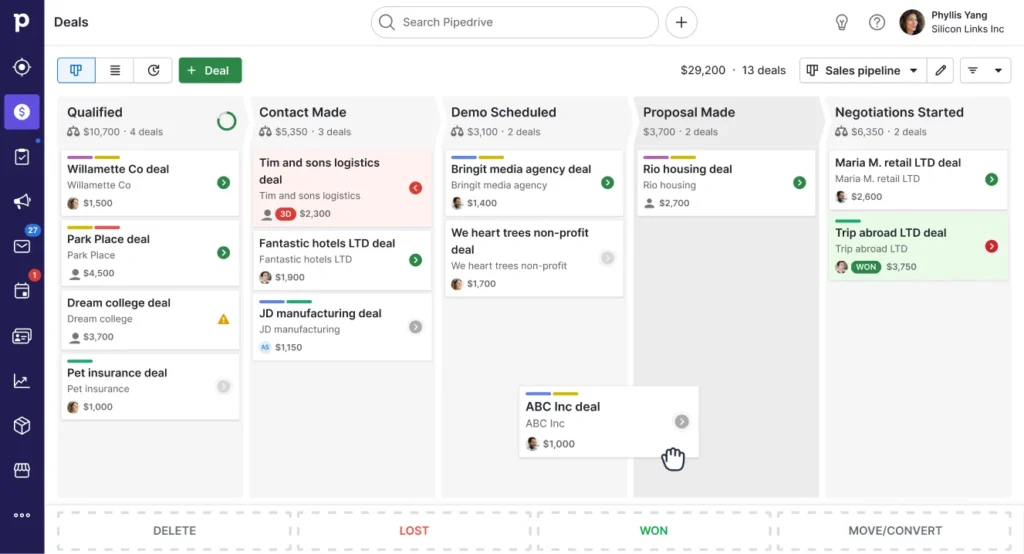
We found the setup fast and focused: you define your pipeline stages, add your deals, and start tracking activity immediately.
Pipedrive nudges you with reminders to follow up, log calls, and schedule next steps, which helps prevent deals from going cold.
The email integration is solid, syncing conversations and letting you send tracked emails directly from within the platform.
Reporting gives you visibility into conversion rates, deal velocity, and revenue forecasts, all presented in a way that's easy to read without a data analytics background.
What we like
Pipedrive's smart contact data feature automatically enriches your contact records by pulling in publicly available information like social profiles, job titles, and company details.
It saves time on manual research and helps you personalize outreach without leaving the CRM.
What users say
Users praise Pipedrive for how intuitive the pipeline view is and how effectively it keeps sales teams focused on the activities that close deals.
"Pipedrive is designed to help businesses manage sales pipelines efficiently. Many service businesses use it to track leads and convert prospects into customers."
The most common criticism is that marketing and customer support features are limited compared to all-in-one platforms like HubSpot.
"Pipedrive is very sales-focused, which is great if that's your primary need, but it lacks built-in marketing automation and customer service tools."
Pricing
All plans billed annually:
- Essential: $14/user/month
- Advanced: $29/user/month
- Professional: $49/user/month
- Power: $64/user/month
- Enterprise: $99/user/month
Stop losing jobs to slow responses
TextNinja turns website visitors into text conversations so your team can respond faster and win more work.
Start free trial
17. Zoho CRM
Best for: Affordable CRM within a broader app ecosystem
Zoho CRM is a strong contender for small businesses that want deep functionality at a price point well below the competition.
We spent time exploring its sales automation, lead management, and reporting features, and found it impressively capable for the cost.
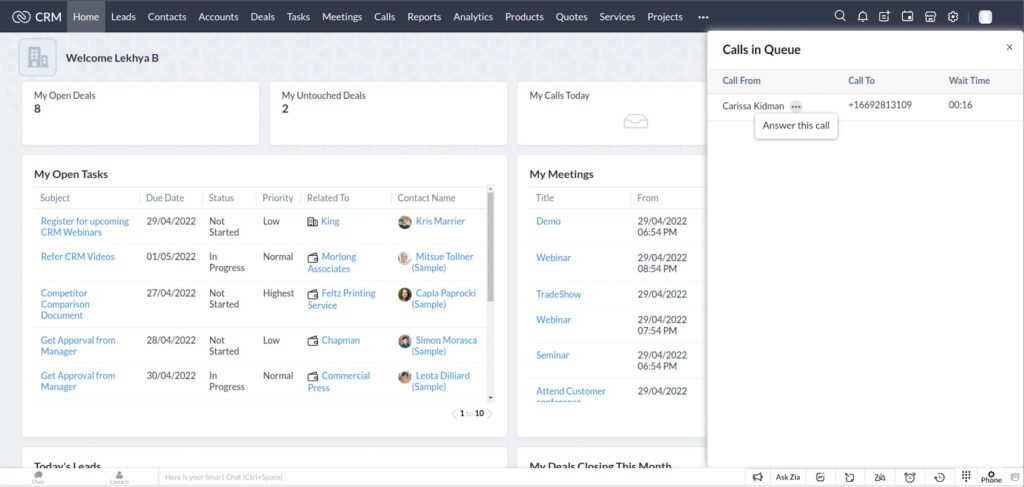
The interface takes a bit more getting used to than HubSpot or Pipedrive, but the trade-off is far more customization: you can build custom modules, layouts, and workflows that match exactly how your business operates.
Zoho's Blueprint feature lets you map out your sales process step by step, ensuring that reps follow the right sequence every time.
The AI assistant, Zia, handles tasks like lead scoring, deal predictions, and anomaly detection, adding intelligence to your pipeline without extra setup.
If you're already in the Zoho ecosystem with tools like Zoho Books, Zoho Projects, or Zoho Desk, the integrations are seamless.
What we like
The Canvas design feature lets you completely redesign the CRM interface with a drag-and-drop editor, so your team sees exactly the layout and data fields they need. It's a level of visual customization you rarely see outside of enterprise-grade tools.
What users say
Users value Zoho CRM's depth of features and affordability, particularly businesses already using other Zoho products.
"Zoho CRM is a flexible and powerful tool. It offers tools for managing leads, sending emails, tracking calls, automating tasks, and analyzing sales performance, all at a very reasonable price."
The learning curve is the most cited drawback, as the sheer number of options and settings can feel overwhelming for small teams with limited admin resources.
"With so many functionalities, Zoho CRM has a steep learning curve. If you want a lean tool that doesn't take much time and brain cells to learn, this one's not for you."
Pricing
Free plan for up to 3 users. Paid plans (billed annually) include:
- Standard: $14/user/month
- Professional: $23/user/month
- Enterprise: $40/user/month
- Ultimate: $52/user/month
File storage & collaboration tools
18. Google Drive
Best for: Real-time document collaboration
Google Drive is the default file storage and collaboration platform for a reason: it works, and most people already know how to use it.
We rely on it daily for shared folders, real-time document editing, and cross-team collaboration, and it handles all of it without friction.
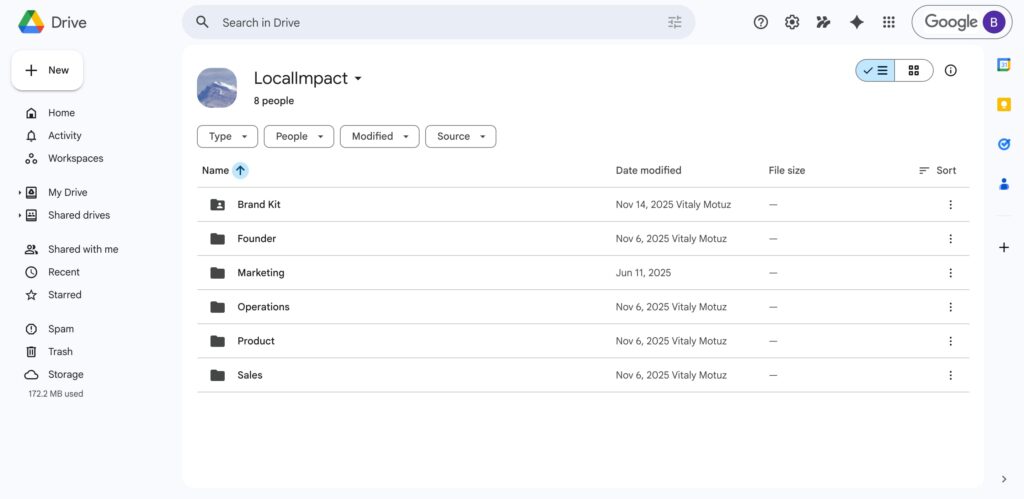
Google Docs, Sheets, and Slides are baked right into Drive, so you can create, edit, and comment on files without downloading anything or switching between apps.
Sharing permissions are granular, letting you control who can view, comment, or edit at the individual file or folder level.
The 15GB of free storage shared across Google services is generous enough for many solo operators, and upgrading to Google Workspace adds custom email, increased storage, and admin controls that growing teams need. Search is fast and accurate, making it easy to find files even in cluttered shared drives.
What we like
Google's Gemini AI integration is a meaningful addition for teams that spend a lot of time in Docs and Sheets.
It can summarize long documents, generate content drafts, and surface insights from spreadsheets, all without leaving the workspace.
What users say
Users love the seamless real-time collaboration and how naturally Google Drive fits into their existing workflows, especially for teams already using Gmail and Google Calendar.
"Google Drive is by far the most popular cloud storage provider. Its seamless integration with Google Docs, Sheets, and Slides makes it indispensable for collaborative work."
The main complaints are that storage fills up quickly when shared with Gmail and Google Photos, and managing permissions across large shared drives can become unwieldy.
"The 15GB free tier is generous, though it's shared with Gmail and Google Photos. Organization can get tricky as workspaces grow."
Pricing
Free with 15GB storage. Google Workspace plans include:
- Business Starter: $7/user/month
- Business Standard: $14/user/month
- Business Plus: $22/user/month
19. Dropbox
Best for: Reliable file syncing across devices
Dropbox has been around long enough to be synonymous with cloud storage, and it's maintained its reputation by doing file syncing better than almost anyone else.
We've used it for years, and the thing that keeps us on it is reliability: files sync fast, version history is dependable, and it works consistently across Mac, Windows, iOS, and Android.
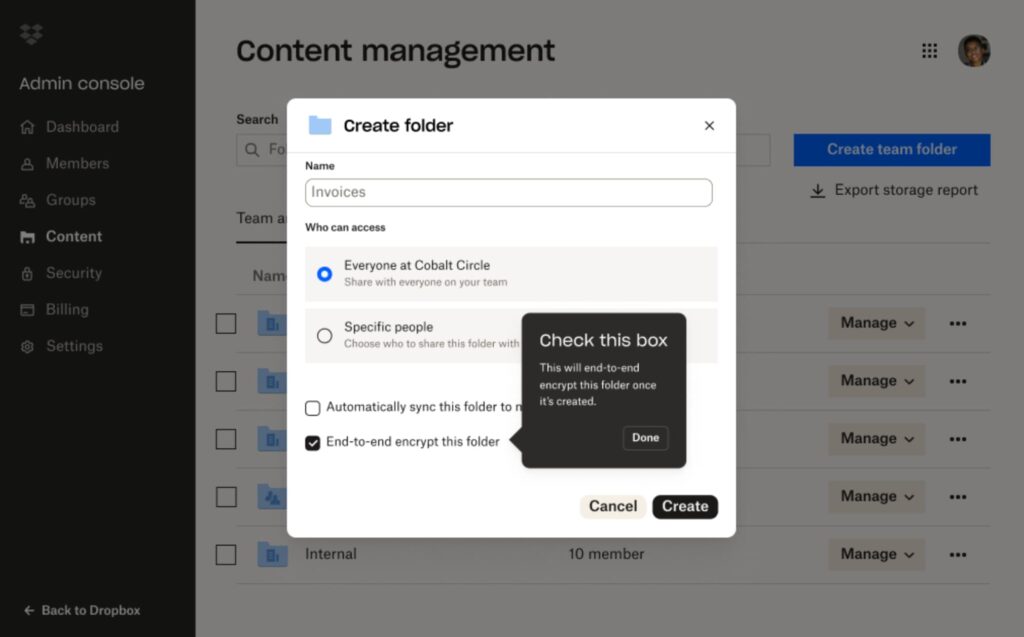
Smart Sync is particularly useful for teams with limited local storage, since it lets you see all your files in Finder or File Explorer without actually downloading them until you need them.
Sharing files externally is clean and professional, with custom-branded links and password protection options. The Dropbox Paper feature adds lightweight document collaboration, though it's more of a nice-to-have than a Google Docs replacement.
Integration with tools like Slack, Zoom, and Adobe Creative Cloud makes it a solid fit for creative and distributed teams.
What we like
Dropbox Replay is a great feature for teams that review visual content.
You can share videos, images, and PDFs and collect frame-accurate, timestamped feedback directly on the file, which streamlines the review process compared to email threads or separate annotation tools.
What users say
Reviewers consistently praise Dropbox for its rock-solid syncing and the simplicity of its interface, making file management feel effortless.
"The first thing that stood out was how smooth the file syncing process was. I uploaded an entire folder of high-resolution marketing assets, and within minutes, they were available across my laptop, phone, and the web app."
The biggest complaints are around pricing, as the free tier is limited to just 2GB, and premium plans are more expensive than competitors offering similar storage.
"Expensive pricing for premium plans with limited free storage."
Pricing
Basic plan free with 2GB. Paid plans include:
- Plus: $11.99/month (2TB)
- Essentials: $22/month (3TB)
- Business: From $15/user/month (billed annually)
20. Microsoft OneDrive
Best for: Businesses already using Microsoft 365
If your business already runs on Microsoft 365, OneDrive is the obvious choice for file storage and collaboration.
It integrates directly with Word, Excel, PowerPoint, and Teams, so creating, editing, and sharing files happens without leaving the Microsoft ecosystem.
We found the co-authoring experience in Word and Excel to be smooth, with real-time cursor tracking and version history that makes collaboration on documents feel seamless.
OneDrive's Personal Vault adds an extra layer of security for sensitive files, requiring additional identity verification to access.
The file sync across Windows, Mac, iOS, and Android is reliable, and the Files On-Demand feature lets you browse your entire cloud library without consuming local storage.
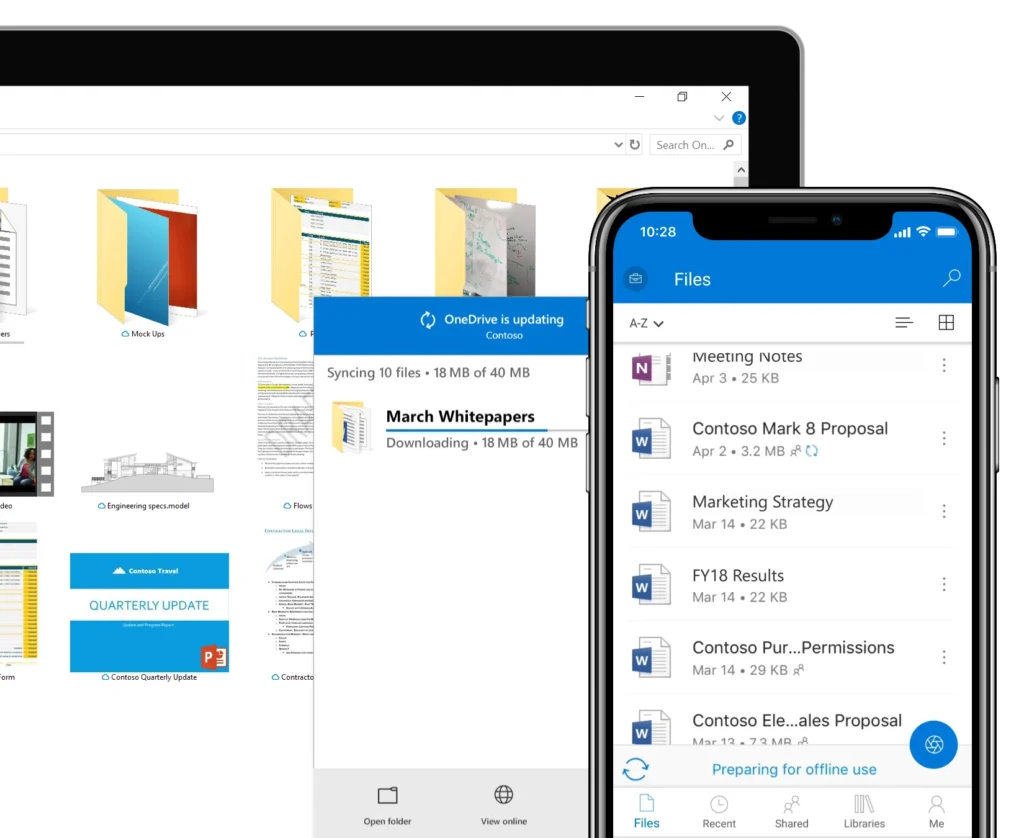
For small businesses that standardize on Microsoft tools, OneDrive ties everything together neatly.
What we like
The integration with Microsoft Teams is where OneDrive really shines in a business context.
Every Teams channel gets its own file library backed by OneDrive and SharePoint, so documents shared in conversations are automatically organized and searchable without any manual filing.
What users say
Users value OneDrive's deep integration with the Microsoft ecosystem and its solid version control for collaborative editing.
"Microsoft OneDrive is one of the best cloud services for internal projects. Users highlight its strong version control, security, and seamless integration with Microsoft 365 for team collaboration."
Common criticisms include syncing conflicts when multiple people edit the same file offline, and the interface feeling less intuitive than Google Drive for users outside the Microsoft ecosystem.
"Syncing issues can crop up, especially when collaborating on files offline. The interface isn't as intuitive as some alternatives if you're not already a Microsoft user."
Pricing
Free with 5GB storage. Microsoft 365 plans include:
- Business Basic: $6/user/month
- Business Standard: $12.50/user/month
- Business Premium: $22/user/month
Scheduling tools
21. Calendly
Best for: Eliminating back-and-forth meeting scheduling
Calendly has become the default scheduling tool for small businesses, and for good reason: it eliminates the back-and-forth of booking meetings entirely.
We set up our first event type in minutes, connected our Google Calendar, and shared a link that lets people book based on our real-time availability.
The experience for the person booking is seamless, with a clean interface that shows open slots, handles time zone detection, and sends automatic confirmation and reminder emails.
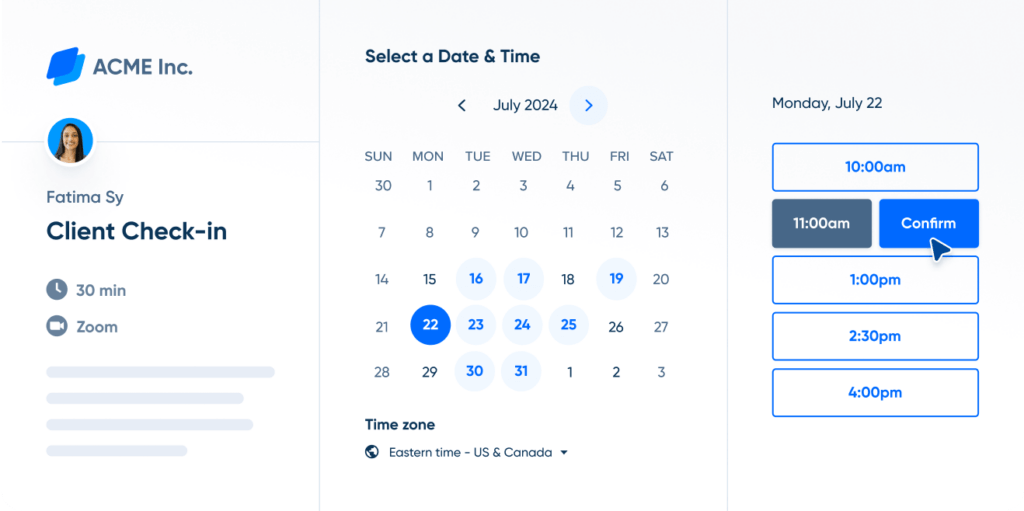
Calendly supports multiple event types, so you can offer different meeting lengths, locations (in-person, phone, Zoom, or Teams), and availability windows from a single account.
For teams, round-robin scheduling distributes bookings evenly across members, and collective scheduling helps find times when multiple people are free.
The tool integrates with Salesforce, HubSpot, Stripe, and dozens more, making it useful well beyond basic appointment booking.
What we like
Calendly's routing feature is a smart addition for businesses that receive a mix of inbound meeting requests.
You can set up a single link that asks qualifying questions and automatically routes the booking to the right team member based on the answers, which saves time on manual triage.
What users say
Reviewers appreciate how much time Calendly saves and how professional the booking experience feels for clients and prospects.
"Calendly stands out with its user-friendly design, customizable scheduling options, and robust integrations that fit seamlessly into your existing workflow."
The main criticism is that the free plan is limited to a single event type, and useful features like automated reminders and team scheduling require paid plans.
"Missing features, like not being able to edit availability for one-off meetings after you click the button, and forcing a preparation question for one-off events, create extra work."
Pricing
Free plan with one event type. Paid plans include:
- Standard: $12/seat/month
- Teams: $20/seat/month
- Enterprise: Custom pricing
22. Acuity Scheduling
Best for: Service businesses that need client self-booking with payments
Acuity Scheduling is built for service-based businesses that need clients to self-book, pay, and manage their own appointments.
We found it particularly well-suited for consultants, coaches, salons, and wellness providers who want to reduce admin time.
The booking page is fully customizable, letting you match your brand colors, add intake forms, and offer multiple service types with different durations and prices.
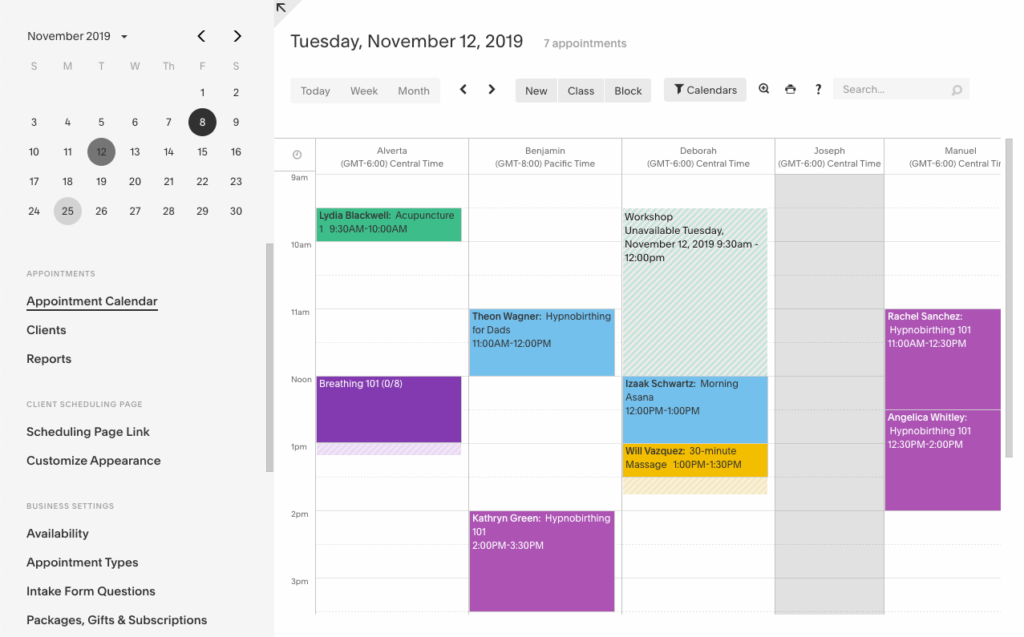
Payments can be collected at the time of booking through Stripe, Square, or PayPal, which significantly reduces no-shows.
Acuity handles package deals and gift certificates natively, making it easy to offer bundles or prepaid sessions.
Automatic reminders and follow-up emails keep clients informed without you having to send anything manually, and two-way calendar sync with Google, Outlook, and iCloud prevents double bookings.
What we like
The intake form builder is a real time-saver for service businesses.
You can attach custom questionnaires to specific appointment types, so clients provide all the relevant information before they walk through the door or join the call, eliminating the need for pre-meeting admin.
What users say
Users praise Acuity for giving them back hours of scheduling admin time and for the polished, professional booking experience it provides to clients.
"Acuity Scheduling gives small business owners an efficient, polished way to let clients self-book, pay, and manage appointments 24/7. It's freeing up your time and reducing no-shows."
The most common complaint is that the interface, while functional, can feel dated compared to newer competitors, and the learning curve for advanced customization is steeper than expected.
"The interface could use a visual refresh. Customizing some of the more advanced settings takes longer than it should."
Pricing
A 7-day free trial is available. Paid plans include:
- Emerging: $16/month (1 staff member)
- Growing: $27/month (up to 6 staff)
- Powerhouse: $49/month (up to 36 staff)
23. Square Appointments
Best for: Solo operators who want free scheduling with integrated payments
Square Appointments is a strong choice for service businesses that want booking and payment processing in one place.
We explored it from the perspective of a small salon or consulting firm, and the integrated experience is genuinely smooth: clients book online, receive automatic confirmations, and can pay when they arrive using Square's point-of-sale hardware or software.
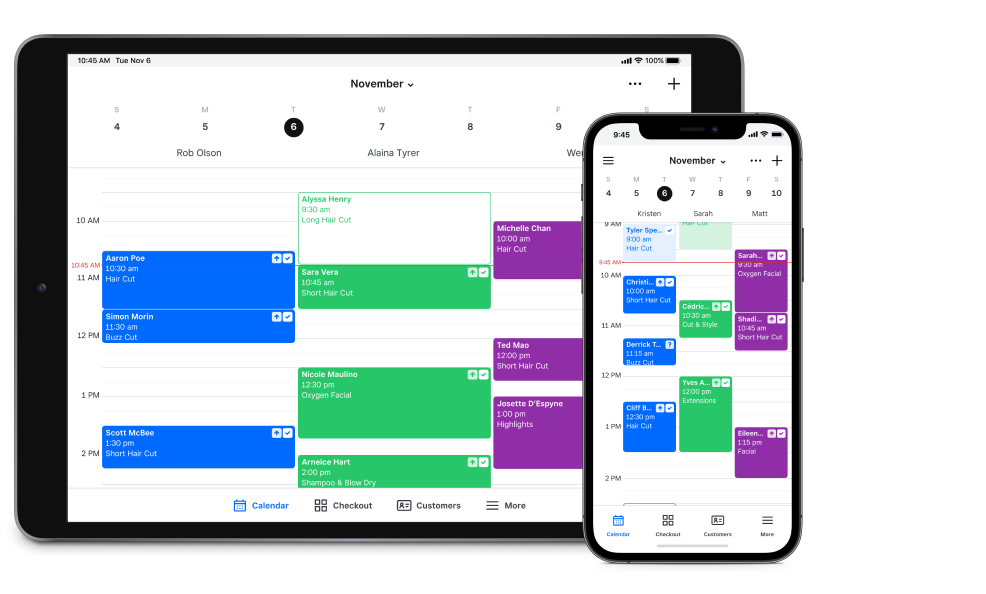
The free plan for solo users includes unlimited appointments, calendar sync, and a customizable booking website, which makes it one of the most generous free scheduling tools available.
The mobile app lets you manage your schedule, process payments, and communicate with clients from your phone.
For businesses with staff, team management features include individual calendars, commission tracking, and permission controls.
Square's broader ecosystem of invoicing, payroll, and marketing tools means you can grow into additional features without switching platforms.
What we like
The built-in no-show protection is a practical feature that many scheduling tools overlook.
You can require a card on file when clients book, and if they don't show up, you have the option to charge a cancellation fee automatically, which protects your revenue without awkward conversations.
What users say
Reviewers love the fact that Square Appointments combines scheduling and payments seamlessly, especially for solo operators who want everything in one system.
"Square Appointments is affordable and easy to use. The ability to collect payments right when clients book or check in makes the whole process seamless."
The main downside is that while the free plan is excellent for individuals, paid plans for teams are pricier than some alternatives, and the scheduling features are less customizable than dedicated tools like Acuity.
"With contractor-only and full-service options, Square Payroll is affordable and easy to use, though its HR tools are limited compared to broader platforms."
Pricing
Free for individuals with unlimited bookings. Paid plans include:
- Plus: $29/month per location
- Premium: $69/month per location
HR tools
24. Gusto
Best for: US small businesses that need payroll and benefits in one platform
Gusto is the HR platform that small businesses reach for when they're ready to stop running payroll on spreadsheets.
We explored it from the lens of a growing team, and the payroll experience is what stands out most: you can run unlimited payroll cycles across all 50 US states, with automatic tax filing, W-2s, 1099s, and direct deposit handled for you.
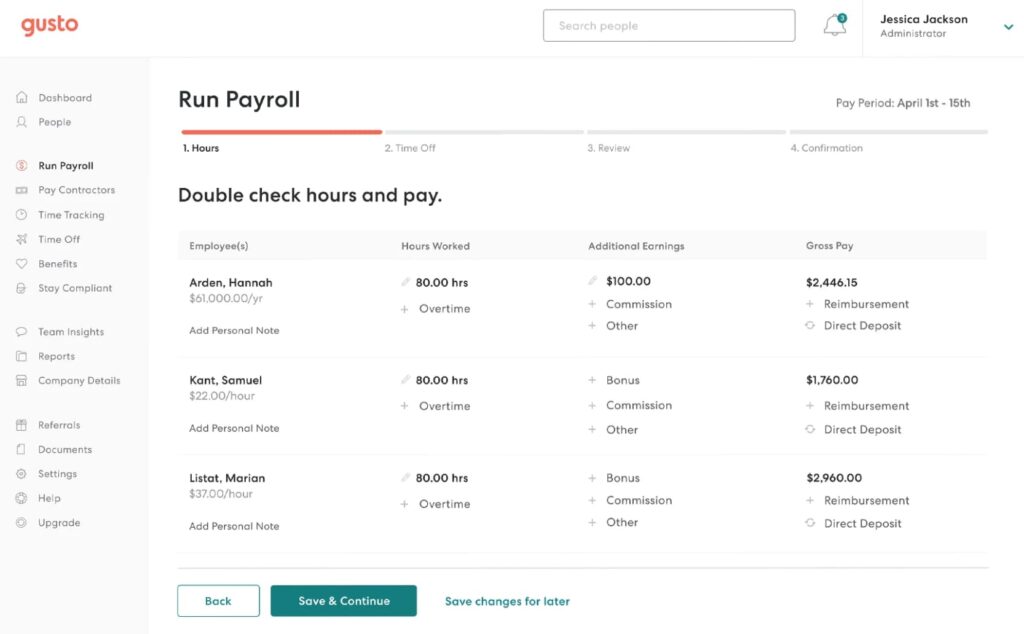
Onboarding new hires is clean and digital, with e-signing, I-9 and W-4 collection, and a welcome flow that gets people set up before their first day.
Benefits administration is built in, covering health insurance, 401(k), and workers' comp, with Gusto acting as the broker so you don't need a separate benefits provider.
Time tracking and PTO management sync directly into payroll, eliminating the manual reconciliation that eats up admin hours every pay period.
The employee self-service portal lets your team access pay stubs, update their info, and manage their benefits independently.
What we like
Gusto's Wallet feature gives employees access to their earned wages before payday, which is a meaningful perk for hourly workers.
It also includes budgeting tools and savings features within the employee app, adding value beyond just payroll processing.
What users say
Users consistently rate Gusto as the best payroll solution for small businesses, praising its simplicity and how much admin time it saves.
"Gusto is the best all-in-one HR and payroll software for small businesses that want affordability without sacrificing functionality."
The main criticism is that Gusto's capabilities thin out for businesses with more complex needs, and some advanced HR features like performance management are only available on the Premium plan.
"Gusto provides the best balance of payroll automation, benefits administration, and compliance features at reasonable pricing, though advanced tools require the Premium plan."
Pricing
Gusto offers the following plans:
- Simple: $40/month + $6/person/month
- Plus: $80/month + $12/person/month
- Premium: Custom pricing
- Contractor-only: $35/month + $6/person/month
Stop losing jobs to slow responses
TextNinja turns website visitors into text conversations so your team can respond faster and win more work.
Start free trial
25. BambooHR
Best for: Growing teams that want a people-first HR experience
BambooHR positions itself as the people-first HR platform, and the experience backs that up.
We found the interface noticeably cleaner and more welcoming than most HR software, with a homepage that lets employees view PTO balances, clock in, and access key documents with a single click.
The employee database centralizes all your people data, from personal info and job history to compensation and performance notes, in a way that's easy to search and maintain.
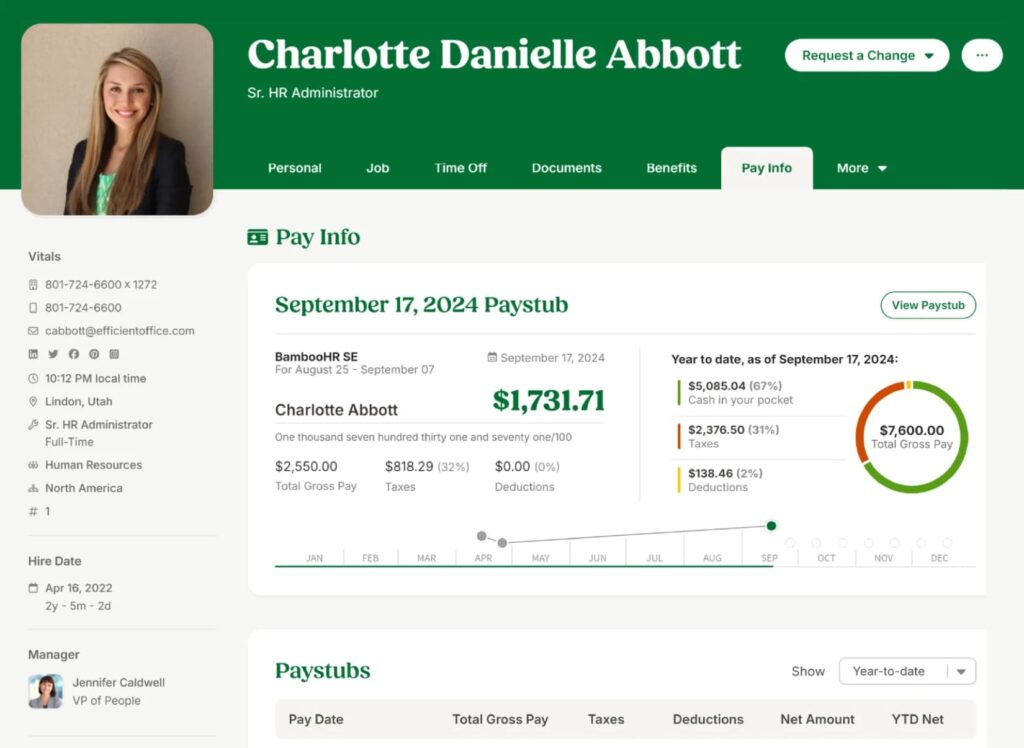
Onboarding workflows are pre-built and customizable, covering everything from welcome emails and document signing to task assignments for hiring managers.
Time-off tracking is straightforward, with visual calendars that show who's out and configurable PTO policies.
BambooHR also includes applicant tracking (ATS) functionality, so you can manage job postings, applications, and candidate communication from the same platform.
What we like
The employee satisfaction surveys and performance review tools are more thoughtful than you'd expect from an SMB-focused platform.
BambooHR uses AI-driven analysis to identify trends in employee feedback, giving leadership actionable insight into team sentiment without sifting through individual responses.
What users say
Reviewers appreciate BambooHR's ease of use and how it brings professionalism to HR processes at small businesses that might not have a dedicated HR team.
"BambooHR is the easiest platform to use on this list. It strikes the right balance between simple, pre-built workflows and advanced features to support complex hire-to-retire processes."
The most common complaint is pricing transparency, as BambooHR doesn't publicly list its rates, and payroll is an add-on rather than an included feature.
"Pricing can be a drawback. Compensation tools and HR benchmarks are limited to the highest tier."
Pricing
BambooHR offers two tiers (Core and Pro) with per-employee pricing. Exact rates require a custom quote. Payroll is available as an add-on. A 7-day free trial is available.
26. Deel
Best for: Hiring and paying international contractors and employees
Deel is the tool you need when your small business starts hiring beyond US borders, or even when you're working with international contractors.
We explored it from the perspective of a remote-first team, and the platform makes global hiring feel surprisingly manageable.
You can onboard contractors in over 150 countries with locally compliant contracts generated automatically, and pay them in their preferred currency through a single dashboard.
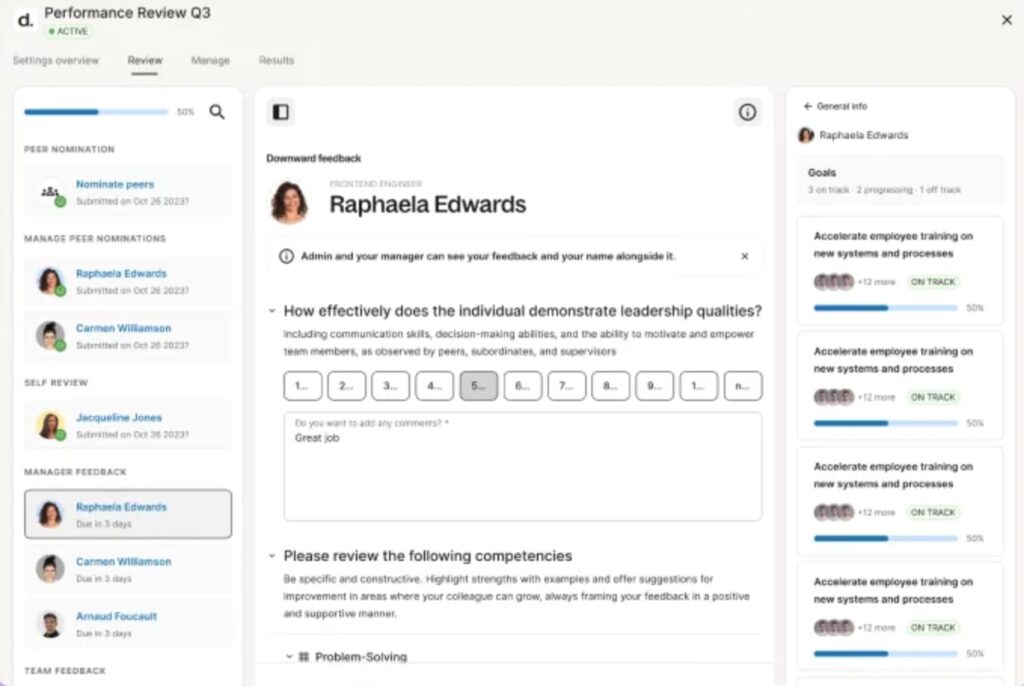
For full-time international hires, Deel's Employer of Record (EOR) service handles local labor law compliance, tax withholding, and benefits administration so you don't need to set up legal entities in every country.
The HR module covers org charts, time off management, and document storage, all centralized for your distributed team. Deel also supports equipment provisioning and stipends, making it a practical tool for managing the full remote employee lifecycle.
What we like
Deel's global payroll consolidation is a standout for businesses operating across multiple countries.
You can run payroll for employees and contractors in different jurisdictions from one platform and get a single invoice, which dramatically simplifies accounting for international teams.
What users say
Users praise Deel for making international hiring and contractor payments straightforward, especially for small businesses without in-house legal or HR teams.
"Deel gives small businesses the ability to hire and manage talent in 150+ countries without navigating local labor rules on their own."
The primary criticism is cost, since EOR and full-time employee services carry a significant per-employee premium that may be hard to justify for very small teams.
"Deel dominates global and remote hiring, but the per-employee costs for EOR services can be substantial for early-stage businesses."
Pricing
Deel HR is free for companies with up to 200 people. Paid services include:
- Contractor management: From $49/month per contractor
- EOR services: From $599/month per employee
- US payroll: From $19/employee/month
Building your small business tool stack
Choosing the right tools comes down to understanding where your time goes and which tasks would benefit most from better software. You don't need all 26 tools on this list.
Most small businesses will do well starting with one tool per category and expanding only when a real need arises.
The best approach is to take advantage of free plans and trials before committing. Nearly every tool on this list offers a way to test it with real work before you spend anything.
Pay attention to how the tool fits your existing workflow, how quickly your team adopts it, and whether it integrates with the other software you already rely on.